
Thread
PS2 Keyboard on Mac Plus
Ever since I got the pile of compacts without keyboards or mice, I've been on the lookout for keyboards. Most of the keyboards I see available are going for about as much as the whole machine, so I haven't picked any up.
Finally, I gave up and decided to make an adapter that allows using a PS2 keyboard on the older compacts.
No fancy fine pitch soldering, just connecting up header pins and some wires. I think it's less than $20 in parts all told.
Here are a couple videos of it in action, but my phone seems to do a pretty poor job of it:
Amber screen Plus
Normal Plus
I've written it up in more detail here along with parts list, links, instructions, and code to the controller.
Right now it has all the keys of the original keyboard mapped, but none of the number pad.
Finally, I gave up and decided to make an adapter that allows using a PS2 keyboard on the older compacts.
No fancy fine pitch soldering, just connecting up header pins and some wires. I think it's less than $20 in parts all told.
Here are a couple videos of it in action, but my phone seems to do a pretty poor job of it:
Amber screen Plus
Normal Plus
I've written it up in more detail here along with parts list, links, instructions, and code to the controller.
Right now it has all the keys of the original keyboard mapped, but none of the number pad.
I'd be happy to help anyone that wants to build one. In the link up above I tried to list the parts and how to build one. The board I used has its own programmer built in, so there's nothing extra there. I used a template from someone else (based on someone else's template, based on ST's sample code), and the README.md in the code has all the instructions on how to setup an environment to build the code and program it. If someone is really interested in building one and programming it is the stumbling block, we can probably figure something out like a virtual machine that has everything ready to go or something.
The short version is that board I used is ~$8 from digikey, I used two premade level converters from adafruit to do the 3.3V to 5V conversion, and then the connectors which I hacked up from existing cords. I'm just using GPIO signals on the board to talk to the Plus on one side, and the PS2 keyboard on the other. It then has a table to convert the scan codes between the two. I'm currently mapping all the keys on the original (non-keypad) keyboard. I'm also using a (ttl) serial port on the board for diagnostics. The windows keys on the ps2 keyboard are the cmd key. I'm not actually implementing all (only 4) of the mac keyboard commands at the moment, the Model Number and Inquiry commands are the two that really need implementing. The other big one is the Instant command to return the keys down at that very moment, but I haven't seen that command actually issued in my testing.
As for the amber screen, it came in one of the Plus' in that big lot. I used it here to see if it got any better results in the video than the stock screen.
The short version is that board I used is ~$8 from digikey, I used two premade level converters from adafruit to do the 3.3V to 5V conversion, and then the connectors which I hacked up from existing cords. I'm just using GPIO signals on the board to talk to the Plus on one side, and the PS2 keyboard on the other. It then has a table to convert the scan codes between the two. I'm currently mapping all the keys on the original (non-keypad) keyboard. I'm also using a (ttl) serial port on the board for diagnostics. The windows keys on the ps2 keyboard are the cmd key. I'm not actually implementing all (only 4) of the mac keyboard commands at the moment, the Model Number and Inquiry commands are the two that really need implementing. The other big one is the Instant command to return the keys down at that very moment, but I haven't seen that command actually issued in my testing.
As for the amber screen, it came in one of the Plus' in that big lot. I used it here to see if it got any better results in the video than the stock screen.
viewtopic.php?t=477#p45939
http://www.timeline-inc.com/blowout.html#monitor
looks like they still sell amber screens.
http://www.timeline-inc.com/blowout.html#monitor
looks like they still sell amber screens.
I don't know why there isn't more people going silly over this...
I mean by hand you created your own working PS/2 to Plus/512k/128k KBD adaptor.
This is not something normal people do.
How long did this take to make once you had all the parts handy and the software done?
How hard would an ADB version be?
I mean by hand you created your own working PS/2 to Plus/512k/128k KBD adaptor.
This is not something normal people do.
How long did this take to make once you had all the parts handy and the software done?
How hard would an ADB version be?
I'm very intrigued by it and impressed with the hack, great job comrade! It'll be great to have the 128kDrexel/Plus/Micromac KVM'd with the rest of the goodies!
The programmable scan code conversion capability of the controller has me even more excited! I've always wanted to have an easily programmable hardware remapping converter:
Caps Lock: make it do useful as opposed to destructive things . . . or nothing at all! [} ] ]'>
- turn it off on (PS/2->PS/2 version, please!) the scan converter by remapping the capslock state to the standard keystroke map.
- use it to map the capslock state to a custom embedded numeric/pagenav(igation) setup for any KBD!
That's all a big assumption on my part, my (Murphy's Law) guess is that CapsLock on the PS/2 interface never hits the CPU/KCHR resource level like it does on the Mac. :-/
Is the scan code for a capslocked k(K) the same for a shift-k(K) on the PS/2 interface or is it a state level difference? :?:
The programmable scan code conversion capability of the controller has me even more excited! I've always wanted to have an easily programmable hardware remapping converter:
Caps Lock: make it do useful as opposed to destructive things . . . or nothing at all! [}
] ]'>- turn it off on (PS/2->PS/2 version, please!) the scan converter by remapping the capslock state to the standard keystroke map.
- use it to map the capslock state to a custom embedded numeric/pagenav(igation) setup for any KBD!
That's all a big assumption on my part, my (Murphy's Law) guess is that CapsLock on the PS/2 interface never hits the CPU/KCHR resource level like it does on the Mac. :-/
Is the scan code for a capslocked k(K) the same for a shift-k(K) on the PS/2 interface or is it a state level difference? :?:
I originally worked entirely with jumper wires like this:

To actually assemble all the pieces onto the perfboard and have it working took maybe 20-30mins? I made a mistake on the first try and had the clock and data lines mixed up on the mac keyboard side, and once that got sorted out, it worked. There's really not that much to it. One thing that might be interesting would be turning the perfboard into a pcb. I might be able to handle that.
It's still powered by 5V (USB or whatever), since the mac keyboard interface can't supply enough power for most ps2 keyboards + this converter.
I've ordered some of the female connectors to not have the floppy wires soldered to the board. Hopefully that'll make it easier on the desk.
As for ADB, that's completely different, and a much more complicated protocol. I'll poke at it eventually, but it's not a simple thing.
Inside Macintosh Volume III was my reference for the scan codes, they're all there. The keyboard is reporting the ky pressed, so there is a scan code for capslock and shift and for 'k'. The keyboard is not aware of capital vs. lower case.
I've internally implemented logic to keep track of the state of the capslock key in order to make the capslock LED work properly on the PS2 keyboard. The keyboard tells me the capslock key was pressed, and I'm sending back a command to the keyboard to turn the LED on or off.
There are a bazillion extra keys on the PS2 keyboard, and I've thought about setting them up to do interesting things on the mac side, but haven't thought of much yet.
To actually assemble all the pieces onto the perfboard and have it working took maybe 20-30mins? I made a mistake on the first try and had the clock and data lines mixed up on the mac keyboard side, and once that got sorted out, it worked. There's really not that much to it. One thing that might be interesting would be turning the perfboard into a pcb. I might be able to handle that.
It's still powered by 5V (USB or whatever), since the mac keyboard interface can't supply enough power for most ps2 keyboards + this converter.
I've ordered some of the female connectors to not have the floppy wires soldered to the board. Hopefully that'll make it easier on the desk.
As for ADB, that's completely different, and a much more complicated protocol. I'll poke at it eventually, but it's not a simple thing.
Inside Macintosh Volume III was my reference for the scan codes, they're all there. The keyboard is reporting the ky pressed, so there is a scan code for capslock and shift and for 'k'. The keyboard is not aware of capital vs. lower case.
I've internally implemented logic to keep track of the state of the capslock key in order to make the capslock LED work properly on the PS2 keyboard. The keyboard tells me the capslock key was pressed, and I'm sending back a command to the keyboard to turn the LED on or off.
There are a bazillion extra keys on the PS2 keyboard, and I've thought about setting them up to do interesting things on the mac side, but haven't thought of much yet.
For the capslock key, the led is off when the keyboard is powered up. If you press the capslock key, the led comes on. If you press it again, the capslock key turns off. And so forth.
The controller does have 5V tolerant IO, but I was not having reliable operation when the uC needed to bring a 5V line low. But, you can try it without the level conversion and see how it goes.
The controller does have 5V tolerant IO, but I was not having reliable operation when the uC needed to bring a 5V line low. But, you can try it without the level conversion and see how it goes.
I was looking at that place a while back for something else. I noticed though that the site hasn't been updated since 2001 and the email inquiry I sent them never got a response. Has anyone tried giving them a call? I would be shocked if they still have any of that stuff, but I wouldn't mind getting a couple of the 5" Samtron CGA monitors if they do.
Well if you ever reach someone there, let me know. I wouldn't mind getting a couple of those 5" Samtron CGA monitors but I suspect I'm about a decade late to the party. I kept meaning to try calling but I'm usually at work during business hours.it's a good number they have a recording saying leave a message for sales orders and someone will call you backso at least someone is paying the phone bill
I've got my Fisher-Price My First PCB in. It works, but there's some rough edges to it.
The PCB is made to use those level converter breakout boards from adafruit. They're about $4 each + shipping, and there's 2 on here. I've tried one without the level conversion, since the GPIOs are 5V tolerant, and it seems to work fine. It just requires wires jumping the connections where the level converter is supposed to go.
So, if anyone is interested in one, let me know. It would be good if the first round of people trying it were comfortable reprogramming the thing. No special hardware required, and the information on setting it up can be found here. I use a linux virtual machine for programming mine.
The firmware as it stands now seems to work ok for me, but it would be good to have some feedback before sending it out to people that can't update.
The board is simple (especially without the level converters), and attaches to the $8 STM32F0DISCOVERY board.
The parts list is that discovery board, the pcb and:
4P4C RJ11 connectors
PS2 connectors
Header connectors for attaching the PCB to the STM32F0DISCOVERY in an easily removable way. I cut these down to 33pins from the stock 40.
2x level converters, apparently optional
If anyone is interested, I can send the blank PCB, an assembled "shield" with or without level conversion, or the assembled shield + stm32f0discovery.
The PCB costs me about $3, and you can see the costs of all the components I've used above.
So a shield without level conversion costs somewhere around $5
With level conversion costs somewhere around $15
Plus the $8 board its self + shipping from digikey.
Currently, I'm testing with a DEC PS2 keyboard on a Plus. It seems to work ok for me, and the control & escape keys even work (they never existed on any Apple keyboards of this type).
I don't currently have any spare STM32F0DISCOVERY boards, so if there's an interest in me purchasing & programming them, I can put together an order. I've 9 available PCBs (10 in the order, 1 for me).
The PCB is made to use those level converter breakout boards from adafruit. They're about $4 each + shipping, and there's 2 on here. I've tried one without the level conversion, since the GPIOs are 5V tolerant, and it seems to work fine. It just requires wires jumping the connections where the level converter is supposed to go.
So, if anyone is interested in one, let me know. It would be good if the first round of people trying it were comfortable reprogramming the thing. No special hardware required, and the information on setting it up can be found here. I use a linux virtual machine for programming mine.
The firmware as it stands now seems to work ok for me, but it would be good to have some feedback before sending it out to people that can't update.
The board is simple (especially without the level converters), and attaches to the $8 STM32F0DISCOVERY board.
The parts list is that discovery board, the pcb and:
4P4C RJ11 connectors
PS2 connectors
Header connectors for attaching the PCB to the STM32F0DISCOVERY in an easily removable way. I cut these down to 33pins from the stock 40.
2x level converters, apparently optional
If anyone is interested, I can send the blank PCB, an assembled "shield" with or without level conversion, or the assembled shield + stm32f0discovery.
The PCB costs me about $3, and you can see the costs of all the components I've used above.
So a shield without level conversion costs somewhere around $5
With level conversion costs somewhere around $15
Plus the $8 board its self + shipping from digikey.
Currently, I'm testing with a DEC PS2 keyboard on a Plus. It seems to work ok for me, and the control & escape keys even work (they never existed on any Apple keyboards of this type).
I don't currently have any spare STM32F0DISCOVERY boards, so if there's an interest in me purchasing & programming them, I can put together an order. I've 9 available PCBs (10 in the order, 1 for me).

I've been hacking around with the pre-adb, adb, ps2, and usb keyboards and mice for a bit and was wondering how much interest there actually is for various adapter bits.
PS2 to pre-ADB
The PS2 mouse and keyboard to pre-adb seems to be working OK for me. I've got the pcbs and components to make the 'cape' for the stm32f0discovery board I've linked above. The boards are powered by USB, since pre-adb systems can't provide enough power for both a PS2 mouse and keyboard, plus the adapter its self. Pre-adb macs are rated at a combined total of 200mA for all peripherals. My PS2 keyboard alone draws 200mA, plus mouse and adapter.
One hiccup with my current pcb is I got the DB9 connections backwards, so a straight through DB9 cable won't work. I'm using a cable I made out of db9 to rj45 adapters and an ethernet cable.
If anyone is interested, I can provide all of the above (I have more than enough of all the components, plus db9 cable), at cost.
PS2 to ADB
Using a hacked up version of the board above, I've got a PS2 mouse working with ADB on a Mac SE and 660av. I've kinda/sorta got some keyboard support working too, the main impediment is just physical connections at the moment. The ADB support works in the simple cases, but it lacks collision detection, so for example doesn't work very well if you plug in 2 keyboards or 2 mice.
If there's interest in this, I can make up some PCBs for PS2 mouse and keyboard to ADB. It'd essentially be the same as the PS2 to pre-ADB. In fact, I'm contemplating making it the same board: PS2 mouse & keyboard on one side, DB9 in the middle, and rj11 and adb ports on the other side. Then a jumper to choose whether it does ADB or pre-ADB. Getting this working would mean getting the adb connector, making up the PCB, and some more software work to glue it all together.
USB to ADB
Using a different chip in the same family, the stm32f4discovery has a USB OTG micro A B connector. It's about $15 from digikey, almost twice the $8 of the stm32f0discovery. It is a different form factor than the stm32f0discovery, so the boards I've made don't fit on it. It also requires a USB OTG micro USB host cable to be able to plug devices into it. This is the same cable as is typically used to plug a USB flash drive into cell phones that support it. I've gotten one of these and have a USB mouse to ADB working with it. I'm messing around with USB keyboard to ADB, and I expect to get it working in the next couple days or so. It's a little more involved than the mouse support due to differences in key press reporting. Another hiccup with keyboard support is many keyboards (all Apple ones, and at least the Dell USB keyboards I've got) are USB hubs with the keyboard device hanging off that. If your keyboard has another USB port on it for a mouse, you've got a USB hub keyboard. These aren't supported, and I probably won't be adding support for them anytime soon. So, any USB keyboard support will be for pure keyboards. This also means the board will only support one device: either a keyboard or a mouse. You could have two of these adapters, but each will only be able to do a keyboard or a mouse, unlike the PS2 version, which does both in one device.
To do this, I'd need to make up some boards, and at least for keyboard support, there's some more work to do at the moment.
USB to pre-ADB
I haven't attempted this at all, but it is a logical extension of the work I've already done. This would have all the same limitations as the USB to ADB version above. The stm32f4discovery is larger than the stm32f0discovery, so any PCB I made would probably be larger and therefore more expensive as well.
One other caveat here is before making these generally available, I would appreciate it if any 'early adopters' would be willing/able to program these with new firmware versions, in the event there's a problem. I am the only one that has used any of this, and I don't claim to write bug-free code. I've also only tested with the keyboards and mice I have on hand, and with the machines I've got. There may be timing differences between manufacturers/models, as well as timing differences with macs in different configurations (OC'd machines, accellerators?). I don't know if there is or not, just calling out the risks. There is no extra hardware required to program these boards, but it does require openocd. I currently use a Linux development environment with openocd, and there are instructions (linked earlier) on how to get it. Once installed, I can provide scripts to program new software into it, but I recognize this is a barrier for some. Perhaps an enterprising Linux hacker could package up a virtual machine with everything ready to go?
If anyone really really wants one of these but can't get the programming environment setup, I'm still more than happy to provide what I've got. I just want to make sure everyone knows what the situation is.
The process I've been using for all this stuff is something along the lines of: get some software working using hacked up cables and stuff just to understand what is possible, and what I need from a PCB. Then order the components I'll be putting on the PCB, so I have some idea of the connector layout, spacing, sizing, etc. Then make up a PCB. I'm using OsmondPCB that trag recommended some time ago. Then send the PCB off to be manufactured. This takes about 3 weeks before I get the boards. Then, I've probably made a mistake, fix it, and send off to have another batch of PCBs made, and wait another 3 weeks. Then once I get a PCB and all the connectors actually fit on it (connector sizing & spacing has been a problem for me), I work through the remaining software issues.
This isn't exactly a fast process, nor is it a cheap one. It's taken me pretty much all summer to get the PCB for the PS2 to pre-ADB working ok, and I still have the DB9 pins backwards. Plus, there's a difference between designing something for myself and for what other people want. This is why I'm asking if there's any real interest, and which of these is more interesting to people. I've tried to lay out the costs, tradeoffs, effort, and timeframe involved in some of this, to let people provide informed input.
I'm willing to donate my time and code to the project, but the cost of materials and shipping I can't do much about. I've already made the Osmond PCB file available for the PS2 to pre-ADB board available, as well as the code. If someone wants to assemble the boards themselves, or produce the boards on their own, by all means go for it. I'll do what I can to help. This is a hobby, I'm not in it for the money. That also means all of this is done in whatever free time I have. Please keep in mind that means all of it is a free time activity: PCB design, coding, troubleshooting, locating parts, shipping, ordering, helping folks, etc.
Also, when thinking about which of the above, if any, is interesting, keep in mind the following:
1) Many USB keyboards and mice support PS2 with a passive adapter. I currently prefer an MS Intellimouse, which is optical, and is usb with PS2 support through a passive adapter.
2) The Gee Three PS2 mouse to ADB adapter is still for sale. I have 2 of these and they're great. My PS2 to ADB adapter could support both mouse and keyboard and be maybe $5 less in parts, but the Gee Three has a much cooler form factor, a nice case, etc. Mine's bare PCB all the way around. If all you're interested in is a PS2 mouse to ADB, this would be the way to go, I think.
3) The old NTI KVMs I mentioned in this thread do PS2 to ADB (as well as Sun) conversion for both keyboard and mouse. If you're looking for a KVM solution, you might be better off with one of these.
Anyway, sorry for the long post. I'm just having fun hacking away on this, which is neat for me, but doesn't really help anyone else. It'd be great if some of my hacking helped someone else, I'm just curious which if any, other people think is most important or interesting. I've gotten zero inquiries on the PS2 to pre-ADB boards. I'm not sure if that's because it's not interesting, or if programming updates is too hard, or if I'm just not presenting it right.
PS2 to pre-ADB
The PS2 mouse and keyboard to pre-adb seems to be working OK for me. I've got the pcbs and components to make the 'cape' for the stm32f0discovery board I've linked above. The boards are powered by USB, since pre-adb systems can't provide enough power for both a PS2 mouse and keyboard, plus the adapter its self. Pre-adb macs are rated at a combined total of 200mA for all peripherals. My PS2 keyboard alone draws 200mA, plus mouse and adapter.
One hiccup with my current pcb is I got the DB9 connections backwards, so a straight through DB9 cable won't work. I'm using a cable I made out of db9 to rj45 adapters and an ethernet cable.
If anyone is interested, I can provide all of the above (I have more than enough of all the components, plus db9 cable), at cost.
PS2 to ADB
Using a hacked up version of the board above, I've got a PS2 mouse working with ADB on a Mac SE and 660av. I've kinda/sorta got some keyboard support working too, the main impediment is just physical connections at the moment. The ADB support works in the simple cases, but it lacks collision detection, so for example doesn't work very well if you plug in 2 keyboards or 2 mice.
If there's interest in this, I can make up some PCBs for PS2 mouse and keyboard to ADB. It'd essentially be the same as the PS2 to pre-ADB. In fact, I'm contemplating making it the same board: PS2 mouse & keyboard on one side, DB9 in the middle, and rj11 and adb ports on the other side. Then a jumper to choose whether it does ADB or pre-ADB. Getting this working would mean getting the adb connector, making up the PCB, and some more software work to glue it all together.
USB to ADB
Using a different chip in the same family, the stm32f4discovery has a USB OTG micro A B connector. It's about $15 from digikey, almost twice the $8 of the stm32f0discovery. It is a different form factor than the stm32f0discovery, so the boards I've made don't fit on it. It also requires a USB OTG micro USB host cable to be able to plug devices into it. This is the same cable as is typically used to plug a USB flash drive into cell phones that support it. I've gotten one of these and have a USB mouse to ADB working with it. I'm messing around with USB keyboard to ADB, and I expect to get it working in the next couple days or so. It's a little more involved than the mouse support due to differences in key press reporting. Another hiccup with keyboard support is many keyboards (all Apple ones, and at least the Dell USB keyboards I've got) are USB hubs with the keyboard device hanging off that. If your keyboard has another USB port on it for a mouse, you've got a USB hub keyboard. These aren't supported, and I probably won't be adding support for them anytime soon. So, any USB keyboard support will be for pure keyboards. This also means the board will only support one device: either a keyboard or a mouse. You could have two of these adapters, but each will only be able to do a keyboard or a mouse, unlike the PS2 version, which does both in one device.
To do this, I'd need to make up some boards, and at least for keyboard support, there's some more work to do at the moment.
USB to pre-ADB
I haven't attempted this at all, but it is a logical extension of the work I've already done. This would have all the same limitations as the USB to ADB version above. The stm32f4discovery is larger than the stm32f0discovery, so any PCB I made would probably be larger and therefore more expensive as well.
One other caveat here is before making these generally available, I would appreciate it if any 'early adopters' would be willing/able to program these with new firmware versions, in the event there's a problem. I am the only one that has used any of this, and I don't claim to write bug-free code.
I've also only tested with the keyboards and mice I have on hand, and with the machines I've got. There may be timing differences between manufacturers/models, as well as timing differences with macs in different configurations (OC'd machines, accellerators?). I don't know if there is or not, just calling out the risks. There is no extra hardware required to program these boards, but it does require openocd. I currently use a Linux development environment with openocd, and there are instructions (linked earlier) on how to get it. Once installed, I can provide scripts to program new software into it, but I recognize this is a barrier for some. Perhaps an enterprising Linux hacker could package up a virtual machine with everything ready to go?If anyone really really wants one of these but can't get the programming environment setup, I'm still more than happy to provide what I've got. I just want to make sure everyone knows what the situation is.
The process I've been using for all this stuff is something along the lines of: get some software working using hacked up cables and stuff just to understand what is possible, and what I need from a PCB. Then order the components I'll be putting on the PCB, so I have some idea of the connector layout, spacing, sizing, etc. Then make up a PCB. I'm using OsmondPCB that trag recommended some time ago. Then send the PCB off to be manufactured. This takes about 3 weeks before I get the boards. Then, I've probably made a mistake, fix it, and send off to have another batch of PCBs made, and wait another 3 weeks. Then once I get a PCB and all the connectors actually fit on it (connector sizing & spacing has been a problem for me), I work through the remaining software issues.
This isn't exactly a fast process, nor is it a cheap one. It's taken me pretty much all summer to get the PCB for the PS2 to pre-ADB working ok, and I still have the DB9 pins backwards. Plus, there's a difference between designing something for myself and for what other people want. This is why I'm asking if there's any real interest, and which of these is more interesting to people. I've tried to lay out the costs, tradeoffs, effort, and timeframe involved in some of this, to let people provide informed input.
I'm willing to donate my time and code to the project, but the cost of materials and shipping I can't do much about. I've already made the Osmond PCB file available for the PS2 to pre-ADB board available, as well as the code. If someone wants to assemble the boards themselves, or produce the boards on their own, by all means go for it. I'll do what I can to help. This is a hobby, I'm not in it for the money. That also means all of this is done in whatever free time I have. Please keep in mind that means all of it is a free time activity: PCB design, coding, troubleshooting, locating parts, shipping, ordering, helping folks, etc.
Also, when thinking about which of the above, if any, is interesting, keep in mind the following:
1) Many USB keyboards and mice support PS2 with a passive adapter. I currently prefer an MS Intellimouse, which is optical, and is usb with PS2 support through a passive adapter.
2) The Gee Three PS2 mouse to ADB adapter is still for sale. I have 2 of these and they're great. My PS2 to ADB adapter could support both mouse and keyboard and be maybe $5 less in parts, but the Gee Three has a much cooler form factor, a nice case, etc. Mine's bare PCB all the way around. If all you're interested in is a PS2 mouse to ADB, this would be the way to go, I think.
3) The old NTI KVMs I mentioned in this thread do PS2 to ADB (as well as Sun) conversion for both keyboard and mouse. If you're looking for a KVM solution, you might be better off with one of these.
Anyway, sorry for the long post. I'm just having fun hacking away on this, which is neat for me, but doesn't really help anyone else. It'd be great if some of my hacking helped someone else, I'm just curious which if any, other people think is most important or interesting. I've gotten zero inquiries on the PS2 to pre-ADB boards. I'm not sure if that's because it's not interesting, or if programming updates is too hard, or if I'm just not presenting it right.
Very, very nice work bbraun!
Just out of curiosity on the USB part, is the hub a software or a hardware limitation? Does the STM32 chip itself not support hubs in host mode, or is it a matter of their software USB stack not supporting it? I don't know nearly enough about USB, I just have noticed hubs have been a problem on a lot of microcontroller USB host projects...
Just out of curiosity on the USB part, is the hub a software or a hardware limitation? Does the STM32 chip itself not support hubs in host mode, or is it a matter of their software USB stack not supporting it? I don't know nearly enough about USB, I just have noticed hubs have been a problem on a lot of microcontroller USB host projects...
As best I can tell it's a software limitation. I've found reference to a couple RTOS' around supporting hubs and the stm32f4, although I wasn't really looking for an RTOS, so didn't dig that deeply. I've also found reference to some commercial stacks that support it.
I'm using the ST sample stack, which fundamentally assumes 1 device. So even if I did get USB hub support working, getting the rest of the stack to understand there may be multiple devices would still be an issue. Adding hub support to the sample stack seems beyond the scope of a hobby project, at least for the amount of time I can realistically invest in it. Finding and converting to an RTOS that already supports hubs on this hardware is an option, although my existing adb & pre-adb code would need to be ported.
I'm using the ST sample stack, which fundamentally assumes 1 device. So even if I did get USB hub support working, getting the rest of the stack to understand there may be multiple devices would still be an issue. Adding hub support to the sample stack seems beyond the scope of a hobby project, at least for the amount of time I can realistically invest in it. Finding and converting to an RTOS that already supports hubs on this hardware is an option, although my existing adb & pre-adb code would need to be ported.
That is my intention: to make all of this available to anyone that wants it.
The PS2 keyboard/mouse to pre-ADB setup (with programmed stm32f0discovery and mouse cable) is $20 + shipping.
You'll need your own mini-b usb cable to power the board.
However, please read the comments above about programming it, testing I've done, etc.
Give me a week or so to get all the pieces, assemble, program, and test the board before shipping.
I tried to describe the current status of the various projects in my earlier post, and the intention was to see if there was any interest in any of them. I'm probably not going to run off PCBs for the other variations just for myself. If anyone is interested in the ps2 to adb, usb to adb, or usb to pre-adb, given my earlier comments, I can certainly work on it.
The PS2 keyboard/mouse to pre-ADB setup (with programmed stm32f0discovery and mouse cable) is $20 + shipping.
You'll need your own mini-b usb cable to power the board.
However, please read the comments above about programming it, testing I've done, etc.
Give me a week or so to get all the pieces, assemble, program, and test the board before shipping.
I tried to describe the current status of the various projects in my earlier post, and the intention was to see if there was any interest in any of them. I'm probably not going to run off PCBs for the other variations just for myself. If anyone is interested in the ps2 to adb, usb to adb, or usb to pre-adb, given my earlier comments, I can certainly work on it.
OK, almost...
So it can use either a stock mac Plus cable (which has two wires swapped, if I remember correctly) and a regular, unmodified cord from a phone?
If it doesn't, it should . Apparently it was a common mistake to use a regular cord in place of the stock one, causing components to blow up and stuff xx( .
I think I might be interested in one of these, so I can at least use a Plus (or 128k-512k) without a stock keyboard (for testing purposes).
Also, is there a chance you might make an ADB to USB (so one can use ADB mice and keyboards on a USB equipped machine)?
c
So it can use either a stock mac Plus cable (which has two wires swapped, if I remember correctly) and a regular, unmodified cord from a phone?
If it doesn't, it should
. Apparently it was a common mistake to use a regular cord in place of the stock one, causing components to blow up and stuff xx( .I think I might be interested in one of these, so I can at least use a Plus (or 128k-512k) without a stock keyboard (for testing purposes).
Also, is there a chance you might make an ADB to USB (so one can use ADB mice and keyboards on a USB equipped machine)?
c
Looking at my plus keyboard cable, it's straight through, but looking at the handset cable I chopped up to make my test cable, it is (was) reversed. Yeah, that would be bad, since power and ground would then be swapped. So, yeah, don't use a handset cable and thanks for pointing that out.
I could do an ADB to USB adapter. The code I have now for ADB is for a device. The host side code is a bit different. But would you be better off getting an iMate? They still show up from time to time on ebay and lemswap. The board I'd use is about $15 + shipping, I'd then need to make a PCB plus components (maybe just an ADB connector?). But I couldn't imagine it being less than about $20-$25, which is slightly cheaper than what iMates seem to go for, but not by much. Plus the iMate is all in a nice case. So, something to think about.
If you're still interested, let me know. Would you be able to program it, or would you be using it as-is?
I could do an ADB to USB adapter. The code I have now for ADB is for a device. The host side code is a bit different. But would you be better off getting an iMate? They still show up from time to time on ebay and lemswap. The board I'd use is about $15 + shipping, I'd then need to make a PCB plus components (maybe just an ADB connector?). But I couldn't imagine it being less than about $20-$25, which is slightly cheaper than what iMates seem to go for, but not by much. Plus the iMate is all in a nice case. So, something to think about.
If you're still interested, let me know. Would you be able to program it, or would you be using it as-is?
Well, I went ahead and did another revision of the pre-ADB/PS2 board to fix the DB9 wiring, and added an ADB port, along with a jumper. The idea is to use the jumper to select between pre-ADB and ADB output. This means another 3-4wks before it arrives. I figure even if no one else cares, that board will be "done" and I'll be able to let the project rest.
I've back burnered the USB version, mainly because it only supports one mouse or one keyboard at a time. That's just kind of unfortunate. Maybe at a future date I can see about some of the alternatives (hardware or software).
As for whether it works on a ROM1 IIgs, I can give it a try. I've got one in the storage room. The ADB project is still currently in the hacked up wires on a hacked up board stage. It's working well enough as a proof of concept, and I'll be working on refining it and adding keyboard support when the new board arrives.
I've back burnered the USB version, mainly because it only supports one mouse or one keyboard at a time. That's just kind of unfortunate. Maybe at a future date I can see about some of the alternatives (hardware or software).
As for whether it works on a ROM1 IIgs, I can give it a try. I've got one in the storage room. The ADB project is still currently in the hacked up wires on a hacked up board stage. It's working well enough as a proof of concept, and I'll be working on refining it and adding keyboard support when the new board arrives.
I have what will probably be the final PCB of this board:

It does both pre-ADB and ADB, keyboard and mouse. I've been using it with an SE and a 9600. I can't claim it's perfect, but I've been using it as my work keyboard & mouse for a day or so, and it seems to work OK for me. It has the Mac/ADB jumper on it, but that's actually ignored. It outputs to both pre-ADB and ADB simultaneously. I've got a video of it controlling a Plus and an SE with the same PS2 keyboard & mouse:
If anyone wants one, let me know. Since anyone buying one will be the first to use it besides myself, you should view this as a chance to participate in the development of this project, rather than viewing it as purchasing a final product. I'm selling these at cost, and if anyone wants the source or gerber files to make them yourself, let me know and I can provide those as well. I think it's about $20 for one of these, plus shipping. I'll need to order the stm32f0discovery and program it before sending any of these out, so there will be some lead time.
I don't plan on any further functional revisions of the PCB. I've got 10 PCBs, I'd like to keep a couple for myself. If there's sufficient interest to kick off another PCB run, I'll probably remove the unused jumper, but that's about it. I'll do software updates as bugs are found and fixed, and the update method is mentioned earlier in the thread.
It does both pre-ADB and ADB, keyboard and mouse. I've been using it with an SE and a 9600. I can't claim it's perfect, but I've been using it as my work keyboard & mouse for a day or so, and it seems to work OK for me. It has the Mac/ADB jumper on it, but that's actually ignored. It outputs to both pre-ADB and ADB simultaneously. I've got a video of it controlling a Plus and an SE with the same PS2 keyboard & mouse:
If anyone wants one, let me know. Since anyone buying one will be the first to use it besides myself, you should view this as a chance to participate in the development of this project, rather than viewing it as purchasing a final product. I'm selling these at cost, and if anyone wants the source or gerber files to make them yourself, let me know and I can provide those as well. I think it's about $20 for one of these, plus shipping. I'll need to order the stm32f0discovery and program it before sending any of these out, so there will be some lead time.
I don't plan on any further functional revisions of the PCB. I've got 10 PCBs, I'd like to keep a couple for myself. If there's sufficient interest to kick off another PCB run, I'll probably remove the unused jumper, but that's about it. I'll do software updates as bugs are found and fixed, and the update method is mentioned earlier in the thread.
Oh, one other thing worth mentioning, I've sent off for some PCBs with both pre-ADB and ADB connectors for the stm32f4discovery board, which is the board I'm using for USB. Again, this board can only handle mouse or keyboard, not both, and it'll probably be ~$30 total for parts. So although no revisions are planned for the ps2 version of the board, progress marches on.
Given the limitation of only one keyboard or mouse per board, and that it'll probably take me at least one more revision of the board to get it satisfactory, I don't expect many takers. I'm mostly making the PCBs as a matter of completeness since I've already done most of the software for it with hacked up cables. May as well make some PCBs and make it usable, even if no one wants them.
Given the limitation of only one keyboard or mouse per board, and that it'll probably take me at least one more revision of the board to get it satisfactory, I don't expect many takers. I'm mostly making the PCBs as a matter of completeness since I've already done most of the software for it with hacked up cables. May as well make some PCBs and make it usable, even if no one wants them.
FWIW, it works for me. The issues I know about currently are:
1) The keyboard LEDs aren't controlled by the computer. System extensions that fiddled with the LEDs on the keyboard won't make the keyboard LEDs blink.
2) more than one keyboard or mouse might not work. My adapter doesn't do any sort of collision detection. Non-keyboard or mouse devices probably will work fine because they'll default to a different address on the adb bus. But having a native keyboard or mouse plugged in along with this adapter probably won't behave right.
3) I'm not entirely sure keyboard repeat works right. I need to do more investigation to see how normal key autorepeat works to make sure I'm doing it right.
Those are just the known issues right now.
I won't really feel comfortable taking someone's money for one of these, even if it is just for the cost of parts, if I don't know it'll work for them. That's why I say anyone that wants one should view it more as participating in the development of the project rather than buying a finished product. I'm literally the only person in the world that has ever used it, with a limited selection of both PS2 and ADB devices.
That said, the above issues are the only ones I know of at the moment. If anyone else is ok with that, I'm fine with sending off a board. I just don't want to misrepresent what you'll get with one of these.
1) The keyboard LEDs aren't controlled by the computer. System extensions that fiddled with the LEDs on the keyboard won't make the keyboard LEDs blink.
2) more than one keyboard or mouse might not work. My adapter doesn't do any sort of collision detection. Non-keyboard or mouse devices probably will work fine because they'll default to a different address on the adb bus. But having a native keyboard or mouse plugged in along with this adapter probably won't behave right.
3) I'm not entirely sure keyboard repeat works right. I need to do more investigation to see how normal key autorepeat works to make sure I'm doing it right.
Those are just the known issues right now.
I won't really feel comfortable taking someone's money for one of these, even if it is just for the cost of parts, if I don't know it'll work for them. That's why I say anyone that wants one should view it more as participating in the development of the project rather than buying a finished product. I'm literally the only person in the world that has ever used it, with a limited selection of both PS2 and ADB devices.
That said, the above issues are the only ones I know of at the moment. If anyone else is ok with that, I'm fine with sending off a board. I just don't want to misrepresent what you'll get with one of these.
I just tested it with an M0116 keyboard, and an MS Intellimouse plugged into the ps2/adb adapter, plugged into the M0116. It seems to work fine.
However, if you're interested in a ps2 mouse to adb adapter only, you might be interested in the Gee Three I linked to earlier.
However, if you're interested in a ps2 mouse to adb adapter only, you might be interested in the Gee Three I linked to earlier.
I was cleaning up my desk a little, and found all the various incarnations of the adapter board, so I lined them all up for a picture. It's a little embarrassing it took me so many iterations (and so long) to get things to where they are. But maybe sharing my learning process can get other people involved, and take the leap on some of their own projects.

On the far left, the initial hand wired adapter for pre-ADB keyboard to PS2 keyboard.
Then the first PCB without any connectors.
Then connectors added.
Then realized I didn't need those level converters after all, and wired them out.
Then revised the PCB to remove the level converters and add pre-ADB and PS2 mouse connectors. The pre-ADB mouse connector was also wired backwards.
Finally, fixed the pre-ADB mouse wiring and added the ADB connector.
Each PCB revision takes about 3-4 weeks of shipping time, during which I can work on the software side of things to fix bugs or add any support needed for the new PCB revision, and each PCB order is for about 10 boards. So, I've got 8 or 9 of each of the older revisions sitting around, probably never to be used.
And that's the course of the project since the initial posting back in June. These projects take a lot of time.
On the far left, the initial hand wired adapter for pre-ADB keyboard to PS2 keyboard.
Then the first PCB without any connectors.
Then connectors added.
Then realized I didn't need those level converters after all, and wired them out.
Then revised the PCB to remove the level converters and add pre-ADB and PS2 mouse connectors. The pre-ADB mouse connector was also wired backwards.
Finally, fixed the pre-ADB mouse wiring and added the ADB connector.
Each PCB revision takes about 3-4 weeks of shipping time, during which I can work on the software side of things to fix bugs or add any support needed for the new PCB revision, and each PCB order is for about 10 boards. So, I've got 8 or 9 of each of the older revisions sitting around, probably never to be used.
And that's the course of the project since the initial posting back in June. These projects take a lot of time.
Very cool! Are you still looking for help with programming and testing the board? I've already got one of those Discovery boards, as well as a few PS/2 keyboards and mice.
Maybe I read too hastily, but how do you connect the the board to the Mac? You said *not* to use a phone cable for the keyboard, but if you need a real Mac keyboard cable, that would seem to defeat the purpose of having a keyboard replacement. And for the mouse, you need a DB-9 straight through male to male cable?
Maybe I read too hastily, but how do you connect the the board to the Mac? You said *not* to use a phone cable for the keyboard, but if you need a real Mac keyboard cable, that would seem to defeat the purpose of having a keyboard replacement.
And for the mouse, you need a DB-9 straight through male to male cable?It'd be great if you wanted to test one out. I just sent out 4 boards attached to the discovery board, but always looking for more people interested.
When I originally setup the keyboard port, I didn't realized telephone handset cords were rolled, so yeah. techknight has suggested a couple fancy tricks to autodetect which cable is being used, but dunno.
The mouse connects with a male/female DB9 straight through cable. The connector on the board is male and the connector on the computer is female. There's also ADB.
When I originally setup the keyboard port, I didn't realized telephone handset cords were rolled, so yeah. techknight has suggested a couple fancy tricks to autodetect which cable is being used, but dunno.
The mouse connects with a male/female DB9 straight through cable. The connector on the board is male and the connector on the computer is female. There's also ADB.
A manual switch to select normal/reverse polarity on the keyboard connection would do the trick, but something automatic would be cool. Are the circuit schematics available for viewing? Because now that I think about it, you shouldn't even need the 5V line coming from the Mac, right? Since the board is powered by USB and not by the Mac? And I'm not sure you need the ground line connected to the Mac either. Both the Mac and your board should be at the same ground potential, through their power supplies to your home's wiring, but it might be bad practice to rely on that. If you could omit both the power and ground connections, then using a reverse-polarity cable wouldn't hurt anything. Then you could modify your software to swap the clock and data connections if it saw that "data" was changing at a faster rate than "clock".
If you don't want to eliminate the ground connection, then a reverse-polarity cable would connect the Mac's 5V to the board's ground, which is bad. You could use a diode to constrain the current to only flow in one direction, or a polyfuse to break the circuit if the current got too high, which would prevent any damage, but the board wouldn't work with the wrong cable.
I was going to suggest an automatic circuit consisting of a couple of transistors, but after more thought I'm not sure if it would actually work reliably. If the two (unknown) power connections from the Mac are A and B, then you want to connect the board's ground to A if B is 5V, and connect the board's ground to B if A is 5V. I think you could use two NPN transistors as switches. Both transistors would have their collector connected to the board's ground. T1 would have its emitter connected to A and base connected to B, and T2 would have its emitter connected to B and base connected to A. You'd also need a current-limiting resistor in the base connections. But I'm not totally certain this would work, for a few reasons I don't feel like describing now. Maybe the manual switch combined with a polyfuse isn't such a bad idea.
Are the circuit schematics available for viewing? Because now that I think about it, you shouldn't even need the 5V line coming from the Mac, right? Since the board is powered by USB and not by the Mac? And I'm not sure you need the ground line connected to the Mac either. Both the Mac and your board should be at the same ground potential, through their power supplies to your home's wiring, but it might be bad practice to rely on that. If you could omit both the power and ground connections, then using a reverse-polarity cable wouldn't hurt anything. Then you could modify your software to swap the clock and data connections if it saw that "data" was changing at a faster rate than "clock".If you don't want to eliminate the ground connection, then a reverse-polarity cable would connect the Mac's 5V to the board's ground, which is bad. You could use a diode to constrain the current to only flow in one direction, or a polyfuse to break the circuit if the current got too high, which would prevent any damage, but the board wouldn't work with the wrong cable.
I was going to suggest an automatic circuit consisting of a couple of transistors, but after more thought I'm not sure if it would actually work reliably. If the two (unknown) power connections from the Mac are A and B, then you want to connect the board's ground to A if B is 5V, and connect the board's ground to B if A is 5V. I think you could use two NPN transistors as switches. Both transistors would have their collector connected to the board's ground. T1 would have its emitter connected to A and base connected to B, and T2 would have its emitter connected to B and base connected to A. You'd also need a current-limiting resistor in the base connections. But I'm not totally certain this would work, for a few reasons I don't feel like describing now. Maybe the manual switch combined with a polyfuse isn't such a bad idea.
I've been working on an 'owner's manual' of sorts wiki page: https://mac68k.info/wiki/display/mac68k/PS2+Adapter
It has discussion on the power situation.
The mac's 5V is not connected to the adapter board. Only 3 of the 4 keyboard wires are connected.
I'd prefer to keep it simple, maybe with small incremental changes, unless someone else wants to do the layout work.
It has discussion on the power situation.
The mac's 5V is not connected to the adapter board. Only 3 of the 4 keyboard wires are connected.
I'd prefer to keep it simple, maybe with small incremental changes, unless someone else wants to do the layout work.
I got my PS2 adapter in the mail today. Rob, this thing is really impressive!
I tested an old Compaq PS2 keyboard with a Mac Plus. I don't have a DB-9 cable yet for mouse testing, and I don't have an ADB Mac handy either. I can confirm that it works with the Compaq keyboard. It's quite a trip, typing on a Mac Plus with a PC-style 101 key keyboard! A few bug reports:
Also a couple of thoughts about the board itself, if you ever decide to do another revision:
Once again, great work! I'll report in again once I have a DB-9 cable, and drag an ADB Mac out of storage for testing. Meanwhile if you can tell me how to plug the two boards back together, I'd appreciate it. :I
I tested an old Compaq PS2 keyboard with a Mac Plus. I don't have a DB-9 cable yet for mouse testing, and I don't have an ADB Mac handy either. I can confirm that it works with the Compaq keyboard. It's quite a trip, typing on a Mac Plus with a PC-style 101 key keyboard! A few bug reports:
- The adapter doesn't seem to work when first powered on, until you press the reset button. I'm not sure if that's expected. After pressing the reset button, a blue LED labeled LD4 turns on, and the adapter works. But at first power-up, LD4 is off.
A few keys on the numeric keypad do unexpected things: The numbers, decimal point, enter key, and the - minus sign work. Num lock does nothing, which is fine. / (forward slash) functions as up arrow. * functions as right arrow, + functions as left arrow.
I also got into a state where the arrow keys did nothing. But after a reset, they worked again. Another time I got into a state where left arrow would type +, right arrow would type *, up arrow would type slash, and down arrow would type =. I think maybe I got this to happen by holding down the arrow keys until the key repeat action kicked in, but not sure.
Function keys, print screen, scroll lock, and pause/break do nothing, which is what I would expect.
I got into a state where Caps Lock turned on the keyboard's indicator LED, and letters typed appeared in all caps. Pressing caps lock a second time turned off the LED, but the keyboard remained in all caps mode. There didn't seem to be any way back to normal mode, expect to reset the board. I tried that test a second time, but couldn't repeat it.
Also a couple of thoughts about the board itself, if you ever decide to do another revision:
- It's 4-ways ambiguous which way the adapter board should be connected to the ST discovery board. It could conceivably be plugged in with the ARM chip facing the adapter board, or away from it, and with the USB port on the same end as the PS2 ports, or the opposite end. In fact I pulled the two boards apart as an experiment, then forgot which way they go together again. Can you remind me? I remember that the ARM chip was away from the adapter board, but not which ends were aligned. An outline of the ST board in the silkscreen on the back of the adapter board would help.
The alignment of the two boards seems backwards to me. You end up with a two-board sandwich with nothing on the inside, and components on the outside. Since you can rest the sandwich adapter-side down (the DB-9 mouse cable would interfere), you have to rest it on the desk with the ARM components on the desk, so the weight of the whole thing is supported by the reset button. Luckily it's a fairly stiff button, but I think it would be nicer if both boards had their components on the "top".
Lastly, I think you could make the adapter board much smaller, and save some money on the PCB. I there a reason the adapter board needs to be the same size as the discovery board? It looks like you could make a smaller board that just connects to the 10-or-so pins on both sides of the USB-end of the discovery board, as that includes power, ground, and a bunch of digital I/Os. Then your board could be about 1/3 the size it is now.
As discussed earlier, it would also be nice to have support for regular phone cable as well as keyboard (reverse-polarity) cable.
Once again, great work! I'll report in again once I have a DB-9 cable, and drag an ADB Mac out of storage for testing. Meanwhile if you can tell me how to plug the two boards back together, I'd appreciate it. :I
Thanks for testing it!
ADB is a bit of a different story, since the Apple Extended Keyboard introduced the 3 LEDs, and the protocol allows for the computer to turn them on/off. Right now, the adapter does not honor the computer's commands to toggle the LEDs, the command is silently ignored. For the most part this doesn't matter, since what the computer is telling the adapter is what the adapter does anyway (turn capslock led on when capslock is pressed, turn it off when pressed again, etc). However, there's a couple little utilities out there to mess with the LEDs of the keyboard for other purposes. I know of at least 2: one that toggles the LEDs to reflect system activity (disk/floppy/etc), and one that just cycles the LEDs.
My current inclination is to leave the existing behavior, since it usually doesn't matter, and it makes the LEDs work with pre-ADB systems.
The board could be made smaller, although for the board shop I'm using, seeed, unless I got it down to a 50cm x 50cm square, it doesn't make any price difference. For price, they come out to about $3 each as-is, and getting down to a 50cm x 50cm square would bring it down to about $1.50 each.
As for the orientation, if the board went on top of the discovery board, the reset button is obscured (not terrible, but hey) and I'm not sure how solid the connection would be between the adapter board and the discovery board, since the pins are shorter. With the current orientation of the adapter board on the bottom, the connectors are too tall to fit between the adapter board and the discovery board, and then the DB9 kinda sticks out anyway. I could experiment with the board being on top.
For the rj11 keyboard connector... As you can see, this board is completely devoid of any electronics. It's purely an adapter board. So far, it's also the most advanced electronics I've done.
For a switch, wouldn't this have to be a 4PDT switch to get it right?
For autodetection, I've gotten several suggestions that are over my head, so... I'm not sure I'm going to get that right.
I'm kind of leading towards just changing it to be telephone handset cord only, and maybe I can get some help on figuring out how to protect the adapter when the computer's 5V is connected to the adapter's ground.
I think I've seen that too. It sounds pretty reproducible, I'll take a look.
This should be a simple mapping thing. The docs on the keypad are a bit wonky, but I'll take another look.
Weird. For PS2 keyboards, the keyboard will do the key repeat and repeatedly send a keydown event. For the mac, they don't, the system handles the autorepeat. I attempt to send a command to the PS2 keyboard to disable the key repeat in the keyboard. It could be that command is failing on your particular keyboard. But the keypad stuff is also a little weird in the protocol, so it could be messed up there as well.
The current behavior is the adapter drives the PS2 keyboard's LED. So when the adapter sees the capslock keydown/keyup, it keeps track of the capslock key state internally and then sends PS2 commands to the keyboard to turn the LED on & off. I originally implemented this behavior when the adapter was pre-ADB only, since pre-ADB keyboards have no LEDs and the protocol has no notion of the computer being able to tell the keyboard to turn them on/off. So the adapter drove the LED state to make it work without OS support.
ADB is a bit of a different story, since the Apple Extended Keyboard introduced the 3 LEDs, and the protocol allows for the computer to turn them on/off. Right now, the adapter does not honor the computer's commands to toggle the LEDs, the command is silently ignored. For the most part this doesn't matter, since what the computer is telling the adapter is what the adapter does anyway (turn capslock led on when capslock is pressed, turn it off when pressed again, etc). However, there's a couple little utilities out there to mess with the LEDs of the keyboard for other purposes. I know of at least 2: one that toggles the LEDs to reflect system activity (disk/floppy/etc), and one that just cycles the LEDs.
My current inclination is to leave the existing behavior, since it usually doesn't matter, and it makes the LEDs work with pre-ADB systems.
Yeah, I should add that to the wiki. The adapter board connects to the bottom of the discovery board (the side with the longer pins), with the PS2 adapters on the same end as the micro USB port on the discovery board.
The board could be made smaller, although for the board shop I'm using, seeed, unless I got it down to a 50cm x 50cm square, it doesn't make any price difference. For price, they come out to about $3 each as-is, and getting down to a 50cm x 50cm square would bring it down to about $1.50 each.
As for the orientation, if the board went on top of the discovery board, the reset button is obscured (not terrible, but hey) and I'm not sure how solid the connection would be between the adapter board and the discovery board, since the pins are shorter. With the current orientation of the adapter board on the bottom, the connectors are too tall to fit between the adapter board and the discovery board, and then the DB9 kinda sticks out anyway. I could experiment with the board being on top.
For the rj11 keyboard connector... As you can see, this board is completely devoid of any electronics. It's purely an adapter board. So far, it's also the most advanced electronics I've done.
For a switch, wouldn't this have to be a 4PDT switch to get it right?
For autodetection, I've gotten several suggestions that are over my head, so... I'm not sure I'm going to get that right.
I'm kind of leading towards just changing it to be telephone handset cord only, and maybe I can get some help on figuring out how to protect the adapter when the computer's 5V is connected to the adapter's ground.
I'm curious as to how this adapter handles the right mouse button. Does it ignore it, or does it map a function to it? Most 2 button ADB mice assign the right button as a click lock, but it wouldn't surprise me if any late production 3rd party mice somehow sent a right button command to the OS even though it wasn't designed for it.
I currently ignore the right click button, does not pass it to MacOS, and do not enable ps2 intellimouse features (such as all the extra buttons, scroll wheel, etc). It could do something with it, but 1) pre-ADB has no way to pass a second button, since the mouse button is a switch on a wire, and there's no second wire, 2) I'll just focus on getting existing functionality working well, I think.
Well.... Now that you mention it, I was thinking about this the other day.
You can make the code if using a keyboard AND mouse with the adapter, to send a Control-click with the right click. Newer OSes use control-click to bring up the contextual menu.
So using a right click on an ADB system (older systems obviously no context). itll fire the context menu.
You can make the code if using a keyboard AND mouse with the adapter, to send a Control-click with the right click. Newer OSes use control-click to bring up the contextual menu.
So using a right click on an ADB system (older systems obviously no context). itll fire the context menu.
Actually, does anyone have a physical Plus keyboard or separate keypad? I'm interested in knowing what these buttons do on the real keyboard.
I'm returning the codes defined in Guide to the Macintosh Family Hardware, but they are the same codes as the keys you're getting (keypad / keycode is 0x1B, which is also the same as up arrow). The keypad behaves a little differently in that it returns a special code to the OS when a keypad key event occurs (0x79), then the OS sends an Instant query command, and then the keypad returns the depressed key. This is what I'm doing, and it seems to be doing what it's supposed to, just what's supposed to happen is a bit odd.
Can you try pressing an upper case keypad forward slash? So hold down shift, press keypad's forward slash key, release forward slash key, release shift. That generates the forward slash for me. According to my reading of Guide to the Macintosh Family Hardware, this is how the physical keypads behave, but again, I don't have one so don't know for sure.
I could map these to their non-keypad equivalent keys, but I'm a little concerned about breaking compatibility with software that cares about the physical position of keys, such as games.
Edit: oh, I have a workaround for the problem of needing a reset when first powered on. I haven't tracked down the source of the cause yet, but I know where it is happening, and can reset from there, since it never recovers from that error condition.
I'm trying to reproduce this and the capslock one, and can't at the moment. It may be related to the keyboard and the keyboard generated autorepeat stuff. I'll try to get some additional ps2 keyboards to test with.
The capslock one, I can see that happening if a key down/up event was missed somewhere along the way. Actually, holding down capslock with other keys pressed might cause it, the pre-ADB keyboard buffer is shallow and might be fixed with using the buffering I'm using with the ADB keyboard.
Yeah, I've thought about doing this and some other fancy stuff, particularly when enabling the PS2 intellimouse extensions for the scrollwheel and extra buttons, then you can use the extra buttons for all kinds of crazy macros and the scroll wheel for arrow up/down or page up/down. Then the next step is a macos control panel to customize those, which then gets into other issues.
At this point, a grand total of 5 people in the universe have these (6 tomorrow, if USPS doesn't mess it up even more), I've only heard from BMOW, and there's a laundry list of things to look at.
So, I'd like to focus on those before getting too far ahead on macros.At a glance I'd think 50mm x 50mm is doable. It's not a huge price difference, but you might as well save a few dollars if it doesn't make everything else more difficult.
Regarding the numeric keypad, don't those keys send two-byte scan codes? That may be what's goofing things up.
Thinking more about the board orientation, I just realized that once you've made the "sandwich", you can rest the boards on their edges and it's pretty stable.
But if you did shrink to a 50mm x 50mm board, you could fit the adapter on top of the Discovery board without covering the buttons - double win!
Let me know if there's anything I can help with on the layout or electronics. I'm no expert either, but I've done a few boards now and they all worked.For the rj11 keyboard connector... As you can see, this board is completely devoid of any electronics. It's purely an adapter board. So far, it's also the most advanced electronics I've done.
For a switch, wouldn't this have to be a 4PDT switch to get it right?
For autodetection, I've gotten several suggestions that are over my head, so... I'm not sure I'm going to get that right.
I'm kind of leading towards just changing it to be telephone handset cord only, and maybe I can get some help on figuring out how to protect the adapter when the computer's 5V is connected to the adapter's ground.
If you used a switch for keyboard vs. telephone cable, I think you're right you'd need some kind of multi-pole switch. Maybe just keep it simple and use a couple of jumpers instead.
Making it only use telephone cords sounds like a fine solution to me. The auto-detection would be really cool, but I know how it can be to have people clamoring to add random extra features to your projects.
But if you want to try it, I got a pretty good auto-detection suggestion from the EEVblog forums - let me make some diagrams and post them in a bit.
Here's the auto-detection keyboard cable circuit. It uses a diode and a 5V DPDT relay - something like http://www.jameco.com/webapp/wcs/stores/servlet/Product_10001_10001_139977_-1

The four lines from the RJ11 connector are labeled A, B, C, and D. If A is +5 V, then the relay is energized, connecting D to the board's ground. If A is GND, then the coil is not energized, and it connects A to the board's ground. D is also passed through to the microcontroller as a digital input, so the program can reverse the meanings of data lines B and C in software.
The flyback diode is there to prevent a voltage surge or spark when the relay turns off.
The four lines from the RJ11 connector are labeled A, B, C, and D. If A is +5 V, then the relay is energized, connecting D to the board's ground. If A is GND, then the coil is not energized, and it connects A to the board's ground. D is also passed through to the microcontroller as a digital input, so the program can reverse the meanings of data lines B and C in software.
The flyback diode is there to prevent a voltage surge or spark when the relay turns off.
Well, sort of. The keypad sends a 0x79 response to the computer's Inquiry command, the computer then sends an Instant command, and then the keypad sends the key event. That's what I'm currently doing. But the physical keypads changed. The original keypad had arrow keys instead of the forward slash and some other keys. Then the Plus keyboard came along, and despite being in one keyboard, it still sent the keypad 0x79 response, and it had the forward slash instead of arrow keys since it had separate arrow keys. But the key codes it is documented to send for those keys are still the arrow key codes. Shift + those keys generate the characters, not the arrow keys.
So, AFAICT without actually having a keypad or a Plus keyboard and going purely from the documentation in IM Volume II and Guide to the Macintosh Family Hardware, the adapter is accurately emulating a separate keypad. I'm really not sure about the Plus keyboard since it was kind of a weird hybrid. I could change the behavior and instead of sending the keypad codes, send the non-keypad variants. forward slash on the keyboard is a different keycode than forward slash on the keypad, and the keyboard one works fine. I'm just not sure if any existing software wants it the way it is now.
True! The USB board is 60cm x 50cm and has all the same connectors. The 60cm is because the stm32f4's headers are farther apart, and I restricted the "height" of the board to 50cm to be within the 50cm x 100cm limits. Oh, except that one lacks the PS2 connectors, which saves a ton of space.
Bmow: I wouldnt use a relay. But I know too that its just a concept ;-)
I would use a 4053 mux or for low r-on use a max4619. Then there is the cbt3125. On and on it goes.... lol. I am pretty good at electronics design, just not so good (only knowing BASIC) with programming.
Using muxes you wouldn't have to alter any programming as the hardware will reroute signals correctly. Then maybe use an led to identify what cable type is being used/plugged in. Simple bi-color across cable pins 1/4 would suffice
Just my 2 cents
I would use a 4053 mux or for low r-on use a max4619. Then there is the cbt3125. On and on it goes.... lol. I am pretty good at electronics design, just not so good (only knowing BASIC) with programming.
Using muxes you wouldn't have to alter any programming as the hardware will reroute signals correctly. Then maybe use an led to identify what cable type is being used/plugged in. Simple bi-color across cable pins 1/4 would suffice
Just my 2 cents
Sorry, I meant on the PS2 end of things: I'm pretty sure the PS2 keyboard scan codes for the numeric keypad keys are multi-byte, whereas the regular alphabetic and number keys have single-byte scan codes.
The only Mac keyboard I have for testing is the Apple M0110, which doesn't have a keypad.
I'm not sure if you were referring the the PS2 keyboard's keypad here, or a Mac Plus keyboard keypad. I just tested this on my PS2 keyboard, and shift-/ types a /, like you said it should.
I would bet that all the bugs I'm seeing could be caused by a missed key event due to buffer overflow. If I type slowly and carefully, everything seems to work OK. But if I mash keys with my fist or do other crazy things, I start to see the types of bugs I mentioned.
But do the transistor-based solutions actually work? That's what I'm struggling with. For example, the 4053 datasheet says it has a maximum "on" resistance of 190 ohms at room temperature. What's going to happen if there's a 190 ohm resistance between the Mac's ground and the Discovery Board's ground? Will it still function as a return path? Will you end up with one ground at a slightly higher voltage than the other, skewing the thresholds for the digital signals? That's why I suggested a relay, for a true hard-wired ground-to-ground connection.
Edit: I should have read your entire sentence.
So the Max4619 has an "on" resistance of 10 ohms. Is that low enough? I'm not sure how to determine it.Ah, right, yes. There's lots of PS2 keys with multibyte scan codes. Some with as many as 6 bytes! That shouldn't be the issue here though. The code synchronously reads in the PS2 codes in the main loop, and the ADB and pre-ADB stuff is all handled asynchronously through a timer interrupt and some context state that keeps track of things. I believe most of the issues are between the adapter and the computer, not the adapter and the ps2 keyboard.
For the forward slash, there's some ambiguity in my reading of the Guide to the Macintosh Family hardware on how the original Mac keypad behaved and the Plus keyboard behaved for those keys. I believe the original Mac keypad had arrow keys where the forward slash and other problem keys are, and you pressed shift to get the forward slash instead of the arrow key. Then the Plus keyboard inverted the case sense since it had separate arrow keys? This is the part where I get fuzzy and wish for a physical keyboard to compare against. So, it is my understanding that with the current behavior the physical keys on the PS2 keypad are being mapped to the same keys in the same physical location on the original Mac keypad. Whether that's 'correct', or what the correct behavior should be is a little more ambiguous I think.
For the missed key events, do they happen when you mash on the non-keypad side of the keyboard, or is it limited to keypad. I have different depths for the keypad vs. keyboard.
Thanks for the feedback!
I just did some extended keyboard mashing, and the only bug I could get to occur was the one where the arrow keys stop working. This happened after smashing caps-lock, shift, letter keys, arrow keys, and keypad keys, all at the same time for several seconds. This bug happened three times, and each time, I was able to restore arrow key function only after pressing and releasing caps lock.
Frankly, it seems pretty robust. I'm not sure why I ran into more bugs yesterday than I did today, but for normal typing instead of crazy keyboard mashing, I don't think anyone would run into any problems.
Frankly, it seems pretty robust. I'm not sure why I ran into more bugs yesterday than I did today, but for normal typing instead of crazy keyboard mashing, I don't think anyone would run into any problems.
Looking further at techknight's suggestion, I believe the current in the ground line should be low enough that it would work. So if you prefer to use the MAX4619 chip instead of the relay, the circuit would look something like this:
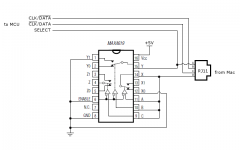
The cost is about the same either way, but the chip would be a little smaller than the relay. Both come in through-hole versions that are no more difficult to solder than the other connectors you've got already.
In your microcontroller software, at startup you'd look at the SELECT input to determine how to configure the CLK and DATA inputs. If SELECT is high, then expect CLK on line B and DATA on line C, or the opposite if SELECT is low.
This is the specific chip I looked at: http://www.digikey.com/product-detail/en/MAX4619CPE%2B/MAX4619CPE%2B-ND/1130171
The cost is about the same either way, but the chip would be a little smaller than the relay. Both come in through-hole versions that are no more difficult to solder than the other connectors you've got already.
In your microcontroller software, at startup you'd look at the SELECT input to determine how to configure the CLK and DATA inputs. If SELECT is high, then expect CLK on line B and DATA on line C, or the opposite if SELECT is low.
This is the specific chip I looked at: http://www.digikey.com/product-detail/en/MAX4619CPE%2B/MAX4619CPE%2B-ND/1130171
Regarding the pre-ADB keypad. I remember having the separate numeric keypad on my 512k, but the arrow keys didn't actually work as they should. I don't recall their behavior though. They may have inserted garbage characters instead of moving the cursor or done nothing at all.
Hah. Actually, the Plus keyboard is even wonkier. If a /(forward slash), *(asterisk), or +(plus) key is pressed on the Plus keyboard's keypad, the Plus keyboard inserts a shift down event into the stream. So, if you press any of those keys, the computer issues Inquiry, the keyboard responds with 0x71 (shift key down), then another Inquiry, then 0x79 (keypad event), then the computer issues an Instant command, the keyboard responds with the proper key code.
This is from Guide to the Macintosh Family Hardware.
But when I implement this, the OS believes the shift key is still held down, which is kind of intuitive unless MacOS is doing extra state tracking.
I'm guessing the keyboard is doing internal checking to see if either shift key is already held down, and if not, also inject a shift up event after the keypad response. It needs to handle the case of pressing shift keypad forward slash, and not inadvertently "release" the held down shift key.
So, I think the adapter needs to keep track of the ps2 keyboard's shift key state, and try to emulate what the Plus keyboard does here.
Super wonky that it's just those three keys, and they chose to inject shift key events.
This is from Guide to the Macintosh Family Hardware.
But when I implement this, the OS believes the shift key is still held down, which is kind of intuitive unless MacOS is doing extra state tracking.
I'm guessing the keyboard is doing internal checking to see if either shift key is already held down, and if not, also inject a shift up event after the keypad response. It needs to handle the case of pressing shift keypad forward slash, and not inadvertently "release" the held down shift key.
So, I think the adapter needs to keep track of the ps2 keyboard's shift key state, and try to emulate what the Plus keyboard does here.
Super wonky that it's just those three keys, and they chose to inject shift key events.
Thanks! I hope it works for you.
I've made a smaller version of the board that will hopefully fit on top of the discovery board instead of on the bottom, like bigmessowires suggested. For now, I've just swapped the rj11 connector to be for the handset. Perhaps the MAX4619 can find a place on the bottom of the board, but in the smaller arrangement, there isn't as much extra space, since all the connectors are through hole.
For posterity, the section of Guid to the Macintosh Family Hardware (2e) that I'm looking at is Chapter 7, p283:
Also, dougg3 tested and had some problems with his PS2 mouse. The keyboard seemed to work fine for him. I've only tested with MS Intellimice, so I'm curious if there's a protocol problem. This friday I'm hoping to go get a hand full of different surplussed PS2 mice to test against.
I've made a smaller version of the board that will hopefully fit on top of the discovery board instead of on the bottom, like bigmessowires suggested. For now, I've just swapped the rj11 connector to be for the handset. Perhaps the MAX4619 can find a place on the bottom of the board, but in the smaller arrangement, there isn't as much extra space, since all the connectors are through hole.
For posterity, the section of Guid to the Macintosh Family Hardware (2e) that I'm looking at is Chapter 7, p283:
The figure is just the list of key codes.Implementing this verbatim results in the computer thinking the shift key is still down after releasing one of the above keypad keys. So, the proper solution AFAICT is to keep track of the PS2 keyboard's shift key, and if it is held down, just send the keypad code, followed by the key code. If it is not held down, send shift down, keypad code, key code, shift up. I'm not a huge fan of trying to keep additional state since it's just something else that could get out of sync, like the caps lock key, but that seems to be the thing to do here.
Also, dougg3 tested and had some problems with his PS2 mouse. The keyboard seemed to work fine for him. I've only tested with MS Intellimice, so I'm curious if there's a protocol problem. This friday I'm hoping to go get a hand full of different surplussed PS2 mice to test against.
For the mouse, do I need a straight-through DB9 cable, or a null modem cable?
Yet another cable polarity to get wrong. But it shouldn't hurt anything to use the wrong cable - it just won't work, right? Or you could add another jumper to select between null modem and straight through.
Edit: Sorry, you already said it was a straight-through cable.
Yet another cable polarity to get wrong.
But it shouldn't hurt anything to use the wrong cable - it just won't work, right? Or you could add another jumper to select between null modem and straight through.Edit: Sorry, you already said it was a straight-through cable.
I was tentitavely interested, but I kind of dropped it... :I
But anyway, I'd be willing to test it out, though it sounds like you all have it going pretty well (I suppose BMOW and dougg3 would be called Beta Testers? If you need another, I'm willing!)
I'll PM with more...
c
But anyway, I'd be willing to test it out, though it sounds like you all have it going pretty well (I suppose BMOW and dougg3 would be called Beta Testers? If you need another, I'm willing!)
I'll PM with more...
c
These directions I linked from the wiki page (and is included in the source, also linked from the wiki page) should cover everything necessary to build the source and program the device. Basically it uses the codesourcery gcc and openocd:
https://github.com/szczys/stm32f0-discovery-basic-template/blob/master/README.md
https://github.com/szczys/stm32f0-discovery-basic-template/blob/master/README.md
I finally got a DB-9 cable, and I can report that PS/2 mouse emulation works great! That is, after I finally found my PS/2 mouse buried in a box of unrelated stuff, and stopped trying to plug it into the ADB port on the board.
If it matters, this is a Logitech 2-button roller ball mouse. Using it with my Mac Plus is a pleasure. The real Mac Plus mouse feels like a lead brick in comparison.
While clicking around the Finder and reading the "about" box, I was reminded that the Mac I'm typing this on now has 2000x more RAM than the Mac Plus. Good times.
Once again, awesome stuff!
If it matters, this is a Logitech 2-button roller ball mouse. Using it with my Mac Plus is a pleasure. The real Mac Plus mouse feels like a lead brick in comparison.
While clicking around the Finder and reading the "about" box, I was reminded that the Mac I'm typing this on now has 2000x more RAM than the Mac Plus. Good times.
Once again, awesome stuff!
Thanks! Yeah, using a modern mouse on the Plus is suuuper smooth in comparison to the original mouse.
As dougg3 found (and fixed, thanks!) the time it takes to reset the mouse can vary, and some take longer than the time I originally waited. This should be fixed in the subversion repository, but if it's working for you, all is well!
Since really only openocd is needed to program the adapter, and that's just an 'apt-get install openocd' away, would it be helpful to anyone to provide a script and firmware binary, to update their adapter? Or a full Linux VM?
In other news, it looks like the usb adapter boards have finally cleared customs (apparently reduced processing capacity due to shutdown or something), and should be here in the next couple days. The smaller, top mounted PS2 adapter boards have been shipped, although ETA remains uncertain with the whole customs thing.
As dougg3 found (and fixed, thanks!) the time it takes to reset the mouse can vary, and some take longer than the time I originally waited. This should be fixed in the subversion repository, but if it's working for you, all is well!
Since really only openocd is needed to program the adapter, and that's just an 'apt-get install openocd' away, would it be helpful to anyone to provide a script and firmware binary, to update their adapter? Or a full Linux VM?
In other news, it looks like the usb adapter boards have finally cleared customs (apparently reduced processing capacity due to shutdown or something), and should be here in the next couple days. The smaller, top mounted PS2 adapter boards have been shipped, although ETA remains uncertain with the whole customs thing.
Arghh, customs!
I haven't tried reprogramming mine, since I haven't found the need. But I suspect the more turn-key you could make it, the better.
The only suggestion I can think of at this point is to change the DB-9 connector to a right-angle connector. That would require having it hang off one side of the board, or making the board wider than the Discovery Board so the DB-9 could be placed on the same edge as the ADB and RJ-11 connectors. As it is now, when all five cables are plugged in, the result is a little unwieldy because cables are sticking off in several different directions. It's not really a big deal, especially if the whole thing is hidden behind your Mac, but it would make it a little more streamlined.
I haven't tried reprogramming mine, since I haven't found the need. But I suspect the more turn-key you could make it, the better.
The only suggestion I can think of at this point is to change the DB-9 connector to a right-angle connector. That would require having it hang off one side of the board, or making the board wider than the Discovery Board so the DB-9 could be placed on the same edge as the ADB and RJ-11 connectors. As it is now, when all five cables are plugged in, the result is a little unwieldy because cables are sticking off in several different directions. It's not really a big deal, especially if the whole thing is hidden behind your Mac, but it would make it a little more streamlined.
Actually one more suggestion:
As it stands now, if I want to use this as a permanent solution, I either need to plug and unplug the Discovery Board, or just leave it turned on and running all the time. It would be great if it only turned on whenever my Mac was on. This would require putting a USB jack (or just a DC in jack) on your adapter board, and then connecting the power from that through a switch to the appropriate pins on the Discovery Board. Basically it would be giving the Discovery Board an on/off switch.
For double extra coolness points, you could replace the switch with a single transistor. Connect the collector to the new USB/DC power input, the emitter to the Discovery Board's power pin, and the base to the Mac's 5V line (from either the Mac keyboard or mouse or ADB connector). Then the Discovery Board would automatically be powered on only when the Mac is turned on.
As it stands now, if I want to use this as a permanent solution, I either need to plug and unplug the Discovery Board, or just leave it turned on and running all the time. It would be great if it only turned on whenever my Mac was on. This would require putting a USB jack (or just a DC in jack) on your adapter board, and then connecting the power from that through a switch to the appropriate pins on the Discovery Board. Basically it would be giving the Discovery Board an on/off switch.
For double extra coolness points, you could replace the switch with a single transistor. Connect the collector to the new USB/DC power input, the emitter to the Discovery Board's power pin, and the base to the Mac's 5V line (from either the Mac keyboard or mouse or ADB connector). Then the Discovery Board would automatically be powered on only when the Mac is turned on.
I finally had a chance to try the keyboard/mouse adapter on an ADB Mac - a PowerMac 8500. Unfortunately it wasn't a total success: the mouse works, but the keyboard doesn't. In SimpleText, typing on the keyboard does nothing at all. In an Open File dialog, typing on the keyboard causes the Mac to play an error chime, or sometimes moves the mouse down by 50 pixels or so. This is with an old Compaq PS/2 keyboard.
Even stranger: after I disconnected the adapter board, and plugged in a real Mac ADB keyboard and mouse, this behavior persisted. So it seems to have left the Mac's ADB driver in a confused state. Rebooting fixed the problem.
I noticed there's an unpopulated 3-pin header on the board, labeled Mac on one side, and ADB on the other side. Do I need to connect a jumper here in order to make it work?
Another thought: the Power Mac 8500 doesn't have any way to force a reboot other than holding command-control-power on the keyboard. Is there a way to do that using your adapter? Which key on the PS/2 keyboard acts as the power key?
Even stranger: after I disconnected the adapter board, and plugged in a real Mac ADB keyboard and mouse, this behavior persisted. So it seems to have left the Mac's ADB driver in a confused state. Rebooting fixed the problem.
I noticed there's an unpopulated 3-pin header on the board, labeled Mac on one side, and ADB on the other side. Do I need to connect a jumper here in order to make it work?
Another thought: the Power Mac 8500 doesn't have any way to force a reboot other than holding command-control-power on the keyboard. Is there a way to do that using your adapter? Which key on the PS/2 keyboard acts as the power key?
It's difficult to tell what the problem is there.
Does toggling the capslock key toggle the led? If so, then at least the adapter and ps2 keyboard are talking.
dougg3 also made a change to the firmware, where I had a pullup on the ADB power line. This didn't seem to affect my 9600, and obviously wouldn't affect an SE, but on his IIci it made it seem like the power key was always down.
And yeah, shift-escape is a power button press.
Does toggling the capslock key toggle the led? If so, then at least the adapter and ps2 keyboard are talking.
dougg3 also made a change to the firmware, where I had a pullup on the ADB power line. This didn't seem to affect my 9600, and obviously wouldn't affect an SE, but on his IIci it made it seem like the power key was always down.
And yeah, shift-escape is a power button press.
Been looking to build this since I thought I had the right Discovery board.
Turns out the board I have has a 24MHz STM32F100 (128kb flash, 8kb RAM, 64 pin package). Is there a chance it'll work?
I need it, since I seem to have lost my last ADB mouse during my last move (
Turns out the board I have has a 24MHz STM32F100 (128kb flash, 8kb RAM, 64 pin package). Is there a chance it'll work?
I need it, since I seem to have lost my last ADB mouse during my last move
(False alarm - I had the adapter board connected though both the ADB and pre-ADB interfaces at the same time. :I That probably didn't help.
I tried it again with just the ADB interface, and it all worked smoothly, keyboard and mouse. Thanks!
I've tried several different Macs now with all the PS/2 devices I have, pre-ADB and ADB, and aside from the occasional problems already mentioned it works great. I give it my official QA sign-off!
Let me know if there's anything else specific you'd like me to test.Awesome! I'm glad it's working for you, and thanks for the feedback.
I've got the PCBs for the USB based adapter. They were ordered before the initial feedback, so they still attach the same way the current ones do: on the bottom of the discovery board. They also lack the indicator of how it should attach. But, they should be good enough to work with, I've just been distracted by other things recently. Hopefully I'll be able to get working on it soon.
I've got the PCBs for the USB based adapter. They were ordered before the initial feedback, so they still attach the same way the current ones do: on the bottom of the discovery board. They also lack the indicator of how it should attach. But, they should be good enough to work with, I've just been distracted by other things recently. Hopefully I'll be able to get working on it soon.