

Thread
Macintosh Plus Internal Hard Drive *Mod*
Oh yeah!!!!! :approve:
Where would you get new SCSI chips?
They're available from an Amiga oriented site (IIRC) that somebody linked to as a source for a SCSI interface PCMCIA and Chiplet Reader Box . . . hrmmm . . .
< scampers off to search bookmarks for "SCSI" heh! [ ] ]'> >
http://a4000t.com/store/index.php?main_page=product_info&products_id=180
SCSI Chip $15
Gotta find a Datasheet to check it against the devil we know, though. :beige:
< scampers off to search bookmarks for "SCSI" heh! [
] ]'> >http://a4000t.com/store/index.php?main_page=product_info&products_id=180
SCSI Chip $15
Gotta find a Datasheet to check it against the devil we know, though. :beige:
i just saw'd my scsi chip out and its doing the same thing... boots to a point and locks up... when i hit the program button it will not let me type.
8-o Woooo . . . and here I thought I was quite a bit more impatient than the average hacker! You win! 
I'm surprised you're even getting as far as :?: in the boot process after that impromptu organectomy!
Sounds like you may have been hit by a random static discharge incident while playing with the toys? How careful were you about avoiding that. I pretty much ignore the possibility other than grabbing everything by a plastic connector or mounting point attached to the ground plane as a matter of habit.
I ALWAYS have skin contact between the hand/wrist/arm that touches the card and the chassis or PSU case during swapouts.
I've got a galvanized steel pan set up as my soldering workstation, but I haven't got around to grounding everything properly or connecting the wrist strap that's still in the envelope.
I'm surprised you're even getting as far as :?: in the boot process after that impromptu organectomy!
Sounds like you may have been hit by a random static discharge incident while playing with the toys? How careful were you about avoiding that. I pretty much ignore the possibility other than grabbing everything by a plastic connector or mounting point attached to the ground plane as a matter of habit.
I ALWAYS have skin contact between the hand/wrist/arm that touches the card and the chassis or PSU case during swapouts.
I've got a galvanized steel pan set up as my soldering workstation, but I haven't got around to grounding everything properly or connecting the wrist strap that's still in the envelope.
Well mcdermd and I were talking about de-grading this machine back to its original 128k glory anyways.
now seems like a good time to get on it
I'm still angry this plus board is screwed, but oh well. My normal success rate when fixing/moding things is extremely high.
now seems like a good time to get on it
I'm still angry this plus board is screwed, but oh well. My normal success rate when fixing/moding things is extremely high.
Now THAT sounds like a great project! :approve:
I'm putting the PCB back on simmer. Can anyone verify that the Controller I linked is pin compatible with NCR 5380?
I'm putting the PCB back on simmer. Can anyone verify that the Controller I linked is pin compatible with NCR 5380?
Yeah, if I was a Mac at Uniserver's house going to be opened up, I would be scared. :I
Here's another config example that could work if there is room. You would still need to desolder the chip and install a socket though unless you can reach the back pins that need a connection.
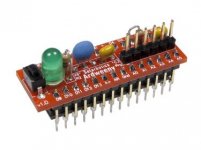
I get farther then that,
I put the 6.0.8 disk in ,,, it starts to boot
it says Welcome to macintosh, and starts to load i can hear floppy disk access, but then it stops after about 4 seconds, and nothing. sits there.
Any idea what is causing it? originally i thought i was a bad scsi chip that was why i saw'd it out.
or do i have to take the board out back and pump a couple buck shots into it ? :-D that'd be more fun!
I put the 6.0.8 disk in ,,, it starts to boot
it says Welcome to macintosh, and starts to load i can hear floppy disk access, but then it stops after about 4 seconds, and nothing. sits there.
Any idea what is causing it? originally i thought i was a bad scsi chip that was why i saw'd it out.
or do i have to take the board out back and pump a couple buck shots into it ? :-D that'd be more fun!
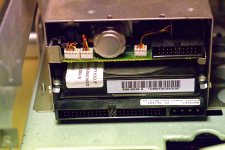
Hope this helps. Just slided the board to get slighly better shot out of it. It's tight packed with power connector, hdd power connector and the opened up scsi cable with the leads soldered on the chip. Would be risky to pull the whole board out. If you want higher resolution picture, PM me.is mi
Edit: Aww.. might need to take another one, difficult to see where the stripes of scsi wiring goes! :disapprove:
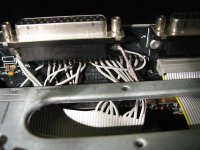
Edit: Aww.. might need to take another one, difficult to see where the stripes of scsi wiring goes! :disapprove:
Ok, finally.. Here are better pictures. That is quite a tricky to open up, those cut-wires are bit in a tight fit from the board to connector. Not much space around. Hope these provide any help. If you need original 18Mpix images, PM me with email address.
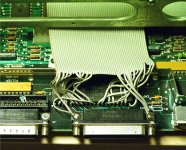
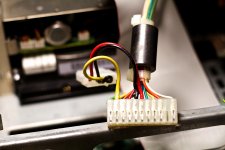
Some modification made on the analog-board.
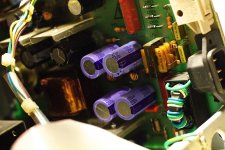
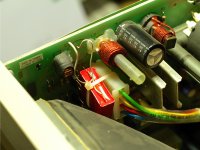
Thank you for those awesome pictures sir!
Hey so it looks like the only A/B mod is a Different / Larger Capacitor? @ C1
Hey so it looks like the only A/B mod is a Different / Larger Capacitor? @ C1
I'm real close to giving this another try!
After doing all these Macintosh Portable HD cables… I now know, and understand the grounding situation a little better !!!
Also i am still going to use a external PSU to power the hard drive,
I have 2 12v pie fans I am going to mount, those will also be powered from the external psu.
After doing all these Macintosh Portable HD cables… I now know, and understand the grounding situation a little better !!!
Also i am still going to use a external PSU to power the hard drive,
I have 2 12v pie fans I am going to mount, those will also be powered from the external psu.
You could tap into the A/B's AC in port (just past the switch) and run everything off one cord (and have it switch on and off with the machine as a bonus).
Also, an uninformed person would never know it's been upgraded, because there wouldn't be any outward signs of it.
c
Also, an uninformed person would never know it's been upgraded, because there wouldn't be any outward signs of it.
c
yup that is what i did with my Macintosh classic already
its in the first post of this thread
its in the first post of this thread
by the way i ended up replacing the caps on my Macintosh Classic A/B and it now supplies enough power for the internal hd.
viewtopic.php?f=7&t=21471&start=0
so i would assume to beef up the PSU in the plus, larger caps would have to be installed.
viewtopic.php?f=7&t=21471&start=0
so i would assume to beef up the PSU in the plus, larger caps would have to be installed.
But doesn't the Classic already have provisions for an internal HD?yup that is what i did with my Macintosh classic already
c
Yes, and you didnt read my first post of this thread.
10 Oct 2012, 13:15
10 Oct 2012, 13:15