
Thread
Just acquired a Macintosh SE. Some questions I have...
A week or so ago, I bought a Macintosh SE (SuperDrive) from eBay. The seller sold it to me for $60 + 17.68 shipping. Which given the price this and other compac Macs were selling for looked like a decent deal. Though it did not come with any additional accesories. It did however have a Asente Network card installed. Neato. Not sure if I will end up using it. I need to buy a transciever for it if I want to put it on my Eithernet network.
I had originally wanted to get an SE/30. But people are charging an arm and a leg for even the broken ones. I'd have to sell a kidney or something to buy one.
So I guess I had to settle on the Macintosh SE. I used to own a Macintosh Plus and a Macintosh Classic when I was a kid. But of coarse I fiddled around them them too much and eventually broke the little glass nub off the end of the CRT tube. Don't ask how I managed to do that. That was almost 20 years ago and of coarse I no longer own either of them. I think I threw them out or left them behind when I moved. Which of coarse I now regret. I thought about re-acquiring a Macintosh Classic on eBay and did try to get one that had a keyboard and mouse in an auction. But that auction quickly escalated to a price range beyond what I could afford. So here I am with a Macintosh SE. Which compared to the Classic...I'm happy I ended up with this instead. It's basically the same as the Classic only better because it has the PDS slot and wasn't gimped. The classic is a gimped SE and the Classic II was a gimped SE/30. Built inferior so the original retail price was lower. I guess Apple sold them as budget models or something.
Anyways I finally got it in the mail a few days ago. Yesterday I finally got my hands on the needed torx bit to open her up. I had a screwdriver with a changable bit, but of coarse it's not long enough for the two screws in the handle. I tried using an extender. It could have reached, but it's too fat so when it gets halfway down there it will jam. So I went to Ace Hardware and found a 2 inch long T15 torx bit to put onto that extender instead of the much shorter one I had. Solved that problem.
Photos:

(I don't have an original ADB keyboard cable, so for now I'm just using a S-Video cable. )
I still have the keyboard from when I used to own the Macintosh Classic. I even had a Performa all ine one. But I think I fried the SCSI controller trying to daisy chain a second drive or something. I'm not sure what happened. I certainly didn't know anything about SCSI at the time. I think the second drive I tried to use wasn't terminated properly. I think I had tried to use my Macintosh Classic Harddrive inplace of the CD-ROM drive to transfer files or something. Two harddrives on the same chain definitely means I'd have to have changed termination/IDs on one of the drives. But I didn't know any better at the time. The annoying thing was the Performa had a caddy based CD drive and I didn't have the stupid caddies, so I couldn't use it. It was a long time ago though. I was one of those kids who took things apart to see how they worked. So inevitably I ended up braking things in some way. I guess in the long run this helped me learn how to build and repair things. I'm self taught when it comes to fixing PCs and stuff and that was basically how I learned it. By constantly messing PCs up when I was younger and finding ways of fixing those mistakes.
The rest are high res so I will post them as links to make it easier to scroll through.
MacSE_Rear.jpg
(This photo was taken by the seller of the Mac and not me. This appears to have a AAUI connector and a BNC connector. There's a switch as well. What setting should that switch be on if I want to use a Ethernet transciever on the AAUI port?)
MacSE_Screen1.jpg
MacSE_Screen2.jpg
(I have no mouse, so I can't check the About this Mac menu. But after inspecting the RAM modules, I know for sure I have 4MB)
Some of the components after I dissassembled it:
MacSE_Motherboard.jpg
MacSE_Motherboard1.jpg
MacSE_Motherboard2.jpg
MacSE_Motherboard3.jpg
MacSE_AsentePDS.jpg
(Note that I had moved the RAM select jumper when I took the above photos. It was originally on the setting for 4MB ram. I moved it back to the correct position afterwords)
Of coarse I've learned my lesson from when I last worked on one of these as a kid, so no more messing with the CRT stuff. There's no need to, I already know what all that does, so why fiddling with something that isn't broken.
I have a few questions though. Currently I'm waiting on getting a hard-drive for this as it didn't come with one. Interestingly who ever owned this last (or perhaps the seller himself) removed the hard-drive but left the baggy with the screws just hanging around loose inside the mac. The bag had a ziplock seal on it, so there was little risk of the screws coming out. But still, this was sloppy on the part of whoever last dissassembled it. That little baggy could have caused me problems if it got nudged into the wrong place during shipping. But luckily it didn't and I spotted it after I got the back off the Mac.
So my first concern is the capaciters. I've hard these old compact macs are starting to show their age and have seen many with leaking/failing capacitors. Thus the reason I had dissassembled to take a closer look. The above photos show that it has a fine layer of dust all over, but otherwise I'm not seeing any obvious issues. The capacitors look fine. The macintosh boots up and works normally from what I can tell. I won't really know 100% for sure until I get a hard-drive installed. The SCSI controller could be dead for all I know. But I don't want to jinx myself. I will just assume that it does. I will find out in about a week or 2 when my hard-drive arrives. I will certainly post an update on that when I get it installed. Although I can't do anything interesting with this Mac until October as I don't have a mouse. I can't do much on these old Macs without a mouse.
I didn't examine the analog board. The screen seems stable and nothing odd going on. The screen width/height is correct as well. (I've noticed some on eBay where they were adjusted to fill the screen. That don't look right to me and I'm glad mine doesn't have that issue. )
If this Macintosh is prone to capacitor issues I would like to know how long I got before it becomes a problem. But for now it seems to be in good condition and is behaving correctly as far as I can tell.
So right now I'm spending this time planning on what I'm going to do to get stuff transferred to it once it has a hard-drive. But I want to do so in a way that won't cost me a ton of money in hard-ware to achieve. Currently I have two options. I can try and get AppleTalk and such working since this Mac happens to have an Asente network card installed. But I don't have a transceiver (this perticular card only has a BNC and AAUI connector I believe), so I will need to get one before I can use it on an Ethernet network which is what everything else in my house is using. My router and my main PC are right next to the Mac, so routing a cable to it will be easy if I end up getting the transciever.
I have already setup Basilisk in a virtual machine (as I use a 64 bit host os and can't use the 32 bit Basilisk LAN drivers for AppleTalk compatibility) and setup a environment where I could in theory get AppleTalk going and share stuff to transfer things to this Mac once I have a hard-drive in it and the needed transceiver. But I don't want to buy the tranciever and this not pan out. I am using VMWare Workstation as my Virtual PC software so assuming it's not doing any funny business with how it's connecting the guest OS to the network, I could get networking going. But I've never networked old Macintoshes before and it may not get the best speeds.
Then comes my next idea. This one I'm leaning more towards. Either way I'm spending at least $10 or so. With the network method I have to buy a tranciever. But this method I have to buy an old ISA SCSI controller which I've found a few in the $10 price range roughly. This is the ISA card I'm interested in getting:
scsicard.jpg
For now I won't post links to the ebay listing for it nor the one for the Mac I bought as I don't know if I'm allowed to post them here. (that and I don't want anyone buying that ISA card before I do. But it's not a big deal I found quite a few others close in price to that one).
My main concern with this method is getting the drivers. I have an old PC with ISA slots and have installed Windows 98 on it. (this machine is a Compac Presario 4508 which could only go to 48MB of ram. So nothing fancy like Windows XP. It did have USB ports though. )
BIOS appears to have an option in the boot menu to boot from an ISA card, so I'm guessing it should get along with an SCSI controller card just fine.
So with this method what would be the best way to transfer data to my Macintosh hard-drive? Can Basilisk connect to the hard-drive directly? I already setup networking with this old PC and my Windows 7 machine can see it fine. So I can send over stuff from my main PC to the old pc and then use Basilisk to then transfer stuff to the hard-drive before throwing it into the Macintosh SE.
But if that doesn't work out, can HFVExplorer see SCSI devices? As for drivers what is the best card on eBay to look for? Most of the cards I've found on eBay (that don't cost an arm and a leg) don't appear to come with drivers, so I will have to go on a google adventure to find them. Not looking forward to that.
If I don't end up using the Asente card, I may end up selling it. I would like to replace it with an accelerator. But I haven't seen any on eBay lately. There is a SE motherboard with one already installed, but they are charging $100+ for it which seems a bit insane.
For now there's no harm leaving it installed. I don't have the original cover for the expansion port, so no sense in leaving a gaping hole back there.
All the old Mac stuff are getting scalped at some insane prices. The little programmers switch thing placed on the side (mine appears to be missing that part) is selling for $33+. There are a few fore $9, but they appear to be for the Classic/Classic 2 and I don't think they would mount to the chassis correctly.
I also noticed my motherboard is missing the plastic cover for the PRAM battery holder. The one I found on eBay is asking for $10 or more....which seems expensive for what amounts to a small piece of plastic. I may just tape the battery down with electrical tape and call it a day. Not paying that much for a battery clip.
The battery didn't pop loose in shipping so it's not like I have to duct tape it down or anything.
I will replace the PRAM battery though. The one currently installed looks original to the machine and that thing could die anyday (or worse, it could pop and leak everywhere which is guranteed to kill the logic board. Definitely don't want to risk that. ). (I have not yet checked if it's holding Date and Time info correctly. I'm wainting on till I have a mouse before I can do. But it doesn't matter since I'm replacing the battery regardless)
I'll definitely be taking good care of this thing unlike the two previous machines I had. These are only getting rarer and more expensive as time passes. I have a fondness for the old Macintosh computers as the school I went to as a kid had a Performa all in one (I forgot what the exact model was) and a few Apple IIe's. I remember computer class was all Macintosh LCs. At least the ones in the Jr. High I went to did. Sadly those days didn't last long. After I moved to my current town I found that all the schools here used PCs. Such a bummer. I loved the Macs and preferred them over the old PCs. Though the PCs in my spanish clas had floppy drives with an self eject mechanism. To this day I still haven't found out what kind of drives those were. Appearently the floppy controller on normal PCs didn't really support self ejecting floppy drives. I think the PCs were NEC branded machines. Would like to know what drives those were. I could even eject the floppy by right clicking it's icon in My Computer and clicking eject like I could with CDs. Such a rare thing for a PC and bsides those PCs in that one class, I only ever thought Macs had drives that could do that.
I'm not much of Apple fan now a days though. The new macintosh (or iMacs as they now like to call them) are all intel machines and are now just glorified PCs in a pretty shell with a premium price attached. The OS is really it's only defining feature and I'm just left dissapointed in that. I miss the days when owning a Macintosh meant owning something that was actually physically different then a PC. Macintoshes used to be in their whole own world. But now apple just builds expensive PCs with Mac OS X which I never really got into.
I'll post more about this Mac as I start to acquire more things for it.
I had originally wanted to get an SE/30. But people are charging an arm and a leg for even the broken ones. I'd have to sell a kidney or something to buy one.
So I guess I had to settle on the Macintosh SE. I used to own a Macintosh Plus and a Macintosh Classic when I was a kid. But of coarse I fiddled around them them too much and eventually broke the little glass nub off the end of the CRT tube. Don't ask how I managed to do that. That was almost 20 years ago and of coarse I no longer own either of them. I think I threw them out or left them behind when I moved. Which of coarse I now regret. I thought about re-acquiring a Macintosh Classic on eBay and did try to get one that had a keyboard and mouse in an auction. But that auction quickly escalated to a price range beyond what I could afford. So here I am with a Macintosh SE. Which compared to the Classic...I'm happy I ended up with this instead. It's basically the same as the Classic only better because it has the PDS slot and wasn't gimped. The classic is a gimped SE and the Classic II was a gimped SE/30. Built inferior so the original retail price was lower. I guess Apple sold them as budget models or something.
Anyways I finally got it in the mail a few days ago. Yesterday I finally got my hands on the needed torx bit to open her up. I had a screwdriver with a changable bit, but of coarse it's not long enough for the two screws in the handle. I tried using an extender. It could have reached, but it's too fat so when it gets halfway down there it will jam. So I went to Ace Hardware and found a 2 inch long T15 torx bit to put onto that extender instead of the much shorter one I had. Solved that problem.
Photos:
(I don't have an original ADB keyboard cable, so for now I'm just using a S-Video cable.
)I still have the keyboard from when I used to own the Macintosh Classic. I even had a Performa all ine one. But I think I fried the SCSI controller trying to daisy chain a second drive or something. I'm not sure what happened. I certainly didn't know anything about SCSI at the time. I think the second drive I tried to use wasn't terminated properly. I think I had tried to use my Macintosh Classic Harddrive inplace of the CD-ROM drive to transfer files or something. Two harddrives on the same chain definitely means I'd have to have changed termination/IDs on one of the drives. But I didn't know any better at the time. The annoying thing was the Performa had a caddy based CD drive and I didn't have the stupid caddies, so I couldn't use it. It was a long time ago though. I was one of those kids who took things apart to see how they worked. So inevitably I ended up braking things in some way. I guess in the long run this helped me learn how to build and repair things. I'm self taught when it comes to fixing PCs and stuff and that was basically how I learned it. By constantly messing PCs up when I was younger and finding ways of fixing those mistakes.
The rest are high res so I will post them as links to make it easier to scroll through.
MacSE_Rear.jpg
(This photo was taken by the seller of the Mac and not me. This appears to have a AAUI connector and a BNC connector. There's a switch as well. What setting should that switch be on if I want to use a Ethernet transciever on the AAUI port?)
MacSE_Screen1.jpg
MacSE_Screen2.jpg
(I have no mouse, so I can't check the About this Mac menu. But after inspecting the RAM modules, I know for sure I have 4MB)
Some of the components after I dissassembled it:
MacSE_Motherboard.jpg
MacSE_Motherboard1.jpg
MacSE_Motherboard2.jpg
MacSE_Motherboard3.jpg
MacSE_AsentePDS.jpg
(Note that I had moved the RAM select jumper when I took the above photos. It was originally on the setting for 4MB ram. I moved it back to the correct position afterwords)
Of coarse I've learned my lesson from when I last worked on one of these as a kid, so no more messing with the CRT stuff. There's no need to, I already know what all that does, so why fiddling with something that isn't broken.
I have a few questions though. Currently I'm waiting on getting a hard-drive for this as it didn't come with one. Interestingly who ever owned this last (or perhaps the seller himself) removed the hard-drive but left the baggy with the screws just hanging around loose inside the mac. The bag had a ziplock seal on it, so there was little risk of the screws coming out. But still, this was sloppy on the part of whoever last dissassembled it. That little baggy could have caused me problems if it got nudged into the wrong place during shipping. But luckily it didn't and I spotted it after I got the back off the Mac.
So my first concern is the capaciters. I've hard these old compact macs are starting to show their age and have seen many with leaking/failing capacitors. Thus the reason I had dissassembled to take a closer look. The above photos show that it has a fine layer of dust all over, but otherwise I'm not seeing any obvious issues. The capacitors look fine. The macintosh boots up and works normally from what I can tell. I won't really know 100% for sure until I get a hard-drive installed. The SCSI controller could be dead for all I know. But I don't want to jinx myself. I will just assume that it does. I will find out in about a week or 2 when my hard-drive arrives. I will certainly post an update on that when I get it installed. Although I can't do anything interesting with this Mac until October as I don't have a mouse. I can't do much on these old Macs without a mouse.
I didn't examine the analog board. The screen seems stable and nothing odd going on. The screen width/height is correct as well. (I've noticed some on eBay where they were adjusted to fill the screen. That don't look right to me and I'm glad mine doesn't have that issue.
)If this Macintosh is prone to capacitor issues I would like to know how long I got before it becomes a problem. But for now it seems to be in good condition and is behaving correctly as far as I can tell.
So right now I'm spending this time planning on what I'm going to do to get stuff transferred to it once it has a hard-drive. But I want to do so in a way that won't cost me a ton of money in hard-ware to achieve. Currently I have two options. I can try and get AppleTalk and such working since this Mac happens to have an Asente network card installed. But I don't have a transceiver (this perticular card only has a BNC and AAUI connector I believe), so I will need to get one before I can use it on an Ethernet network which is what everything else in my house is using. My router and my main PC are right next to the Mac, so routing a cable to it will be easy if I end up getting the transciever.
I have already setup Basilisk in a virtual machine (as I use a 64 bit host os and can't use the 32 bit Basilisk LAN drivers for AppleTalk compatibility) and setup a environment where I could in theory get AppleTalk going and share stuff to transfer things to this Mac once I have a hard-drive in it and the needed transceiver. But I don't want to buy the tranciever and this not pan out. I am using VMWare Workstation as my Virtual PC software so assuming it's not doing any funny business with how it's connecting the guest OS to the network, I could get networking going. But I've never networked old Macintoshes before and it may not get the best speeds.
Then comes my next idea. This one I'm leaning more towards. Either way I'm spending at least $10 or so. With the network method I have to buy a tranciever. But this method I have to buy an old ISA SCSI controller which I've found a few in the $10 price range roughly. This is the ISA card I'm interested in getting:
scsicard.jpg
For now I won't post links to the ebay listing for it nor the one for the Mac I bought as I don't know if I'm allowed to post them here. (that and I don't want anyone buying that ISA card before I do. But it's not a big deal I found quite a few others close in price to that one).
My main concern with this method is getting the drivers. I have an old PC with ISA slots and have installed Windows 98 on it. (this machine is a Compac Presario 4508 which could only go to 48MB of ram. So nothing fancy like Windows XP. It did have USB ports though.
)BIOS appears to have an option in the boot menu to boot from an ISA card, so I'm guessing it should get along with an SCSI controller card just fine.
So with this method what would be the best way to transfer data to my Macintosh hard-drive? Can Basilisk connect to the hard-drive directly? I already setup networking with this old PC and my Windows 7 machine can see it fine. So I can send over stuff from my main PC to the old pc and then use Basilisk to then transfer stuff to the hard-drive before throwing it into the Macintosh SE.
But if that doesn't work out, can HFVExplorer see SCSI devices? As for drivers what is the best card on eBay to look for? Most of the cards I've found on eBay (that don't cost an arm and a leg) don't appear to come with drivers, so I will have to go on a google adventure to find them. Not looking forward to that.
If I don't end up using the Asente card, I may end up selling it. I would like to replace it with an accelerator. But I haven't seen any on eBay lately. There is a SE motherboard with one already installed, but they are charging $100+ for it which seems a bit insane.
For now there's no harm leaving it installed. I don't have the original cover for the expansion port, so no sense in leaving a gaping hole back there.
All the old Mac stuff are getting scalped at some insane prices. The little programmers switch thing placed on the side (mine appears to be missing that part) is selling for $33+. There are a few fore $9, but they appear to be for the Classic/Classic 2 and I don't think they would mount to the chassis correctly.
I also noticed my motherboard is missing the plastic cover for the PRAM battery holder. The one I found on eBay is asking for $10 or more....which seems expensive for what amounts to a small piece of plastic. I may just tape the battery down with electrical tape and call it a day. Not paying that much for a battery clip.
The battery didn't pop loose in shipping so it's not like I have to duct tape it down or anything.
I will replace the PRAM battery though. The one currently installed looks original to the machine and that thing could die anyday (or worse, it could pop and leak everywhere which is guranteed to kill the logic board. Definitely don't want to risk that.
). (I have not yet checked if it's holding Date and Time info correctly. I'm wainting on till I have a mouse before I can do. But it doesn't matter since I'm replacing the battery regardless)I'll definitely be taking good care of this thing unlike the two previous machines I had. These are only getting rarer and more expensive as time passes. I have a fondness for the old Macintosh computers as the school I went to as a kid had a Performa all in one (I forgot what the exact model was) and a few Apple IIe's. I remember computer class was all Macintosh LCs. At least the ones in the Jr. High I went to did. Sadly those days didn't last long. After I moved to my current town I found that all the schools here used PCs. Such a bummer. I loved the Macs and preferred them over the old PCs. Though the PCs in my spanish clas had floppy drives with an self eject mechanism. To this day I still haven't found out what kind of drives those were. Appearently the floppy controller on normal PCs didn't really support self ejecting floppy drives. I think the PCs were NEC branded machines. Would like to know what drives those were. I could even eject the floppy by right clicking it's icon in My Computer and clicking eject like I could with CDs. Such a rare thing for a PC and bsides those PCs in that one class, I only ever thought Macs had drives that could do that.
I'm not much of Apple fan now a days though. The new macintosh (or iMacs as they now like to call them) are all intel machines and are now just glorified PCs in a pretty shell with a premium price attached. The OS is really it's only defining feature and I'm just left dissapointed in that. I miss the days when owning a Macintosh meant owning something that was actually physically different then a PC. Macintoshes used to be in their whole own world. But now apple just builds expensive PCs with Mac OS X which I never really got into.
I'll post more about this Mac as I start to acquire more things for it.
I've been offered one today. Can't wait to pick it up. 
Really looking forward to hacking around on it. Will watch this thread closely. :b&w:
Really looking forward to hacking around on it. Will watch this thread closely. :b&w:
That's a good choice for the first foray back into the classic machines, for the most part they're very reliable. Getting one with a network card is a stroke of luck, there aren't many of those floating around for the compacts anymore.
On the SE you should be okay, they aren't nearly as susceptible to capacitor failure as the SE/30 and later machines.
I would skip trying to network the SE straight into a newer PC, while it's cool to be able to say you've done so, it's a lot of hassle and requires an intermediary machine running an older version of Netatalk. To my knowledge HFVExplorer doesn't work with physical SCSI devices, but I may be mistaken. I've had the best luck with a newer Mac acting as a bridge machine. Early G3s seem to be at the bottom of their value curve and will play nicely with newer machines while still directly interfacing with the older ones (and are much easier to set up than a linux box running Netatalk IMHO).
SE accelerators don't seem to pop up all that often and when they do they're on the higher side. I would think you'd do pretty well if you decided to sell the network card.
A lot of people on "everyone's favorite auction site" seem to think old = rare and valuable, which is usually not the case but at the end of the day all the stuff is worth what others are willing to pay for it. I wouldn't worry about the cover for the battery holder. Unless you really jostle the machine the battery shouldn't pop loose. Smart to replace the battery though, there's a thread on here for what can happen if you don't and it's not pretty.
Sssshhh! Most of the public is still brainwashed into thinking new Macs are somehow better than PCs despite being built with identical hardware and (in some cases) Windows actually running better on the older ones than OS X.
Joking aside, I think a number of people on here have a similar mindset. Everything I'd like to run tends to be on the PC side of things and since many Macs starting with the 2013 models are disposable, throw away machines (non-upgradable) I really don't see myself buying a newer one. With that being said, not being able to upgrade a machine is not a deal breaker for everyone and they can be quite reliable machines, if a bit on the expensive side. Different strokes for different folks.
You may be able to find an SE/30 motherboard/logic board which I believe you can swap out. You can sell the SE logic board as well. Your ethernet card wouldn't work, but you can sell it and buy an Asanté EN/SC, which doesn't need a transciever. You can get an EN/SC for around US$60. (I have seen them listed at up to US$80, but I got mine in an auction for US$50.50. I didn't win the auction but the seller had multiple units and sold one to me and one to the auction winner for something like US$57-ish.)
Thanks for the response! Yeah I agree the SE is a great start on getting a compact Mac. I could have also gotten a Macintosh Plus or 128k/512k. But for what ever reason I prefer to have something that can use an internal hard-drive (without doing some wierd after-market mods to the system. ) and can run MacOS 7. So I've always had a preference towards the Macintosh SE and newer compacts. SE and SE/30 would definitely be my favorites. Having a Classic or Classic II would be nice, but I think I would only consider getting those as a second machine to pair with what I already have and not as the primary Macintosh.
Yeah the network method seems like it wouldn't work out. I may get the transciever anyway just so I have a complete set for the Asente card. It would make it easier to sell.
I can't afford to buy a bridge machine at this stage. My income is pretty limited.
I may try and network it to Basilisk anyway if I end up getting the transciever. Doesn't hurt to try.
The ISA method is looking to be complicated as well. The version of Basilisk I have can indeed access a drive in this manner from what I read, but I've heard it can cause data corruption after a few uses. I would definitely want to avoid that.
But I do have TransMac and it's helpfile says it supports SCSI drives. I can create images and write them back using that I would think.
I could also try and get my hands on an external SCSI CD-ROM drive. I could then just burn a HFV image to a CD (I've already done this with the "Legacy Recovery CD" image, and Basilisk boots from it. So I assume a real Mac would too) and use that to transfer things to the Mac.
Of coarse they are also running at high prices on eBay.
I can try and offset the cost by selling the Asente card. I kinda don't want to let go of it now given how lucky I got with finding a Mac that has one.
I could get a SE/30 motherboard. But here's the thing. My mother is also a fan of the old Macs and I've already told her I would give her this SE once I have gotten an SE/30. So the only way I'm getting a SE/30 is if I get one as an entire unit. Besides, I want an SE/30 with the matching case. Sure, throwing a SE/30 mobo into an SE case would work, but it wouldn't be the same for me.
The SE/30's definitely have capacitor issues, so it looks like I will definitely have to deal with that when I get one. Finding one with caps already replaced would be expensive. It probably won't be till tax refund day next year before I can afford to get one.
) and can run MacOS 7. So I've always had a preference towards the Macintosh SE and newer compacts. SE and SE/30 would definitely be my favorites. Having a Classic or Classic II would be nice, but I think I would only consider getting those as a second machine to pair with what I already have and not as the primary Macintosh. Yeah the network method seems like it wouldn't work out. I may get the transciever anyway just so I have a complete set for the Asente card. It would make it easier to sell.
I can't afford to buy a bridge machine at this stage. My income is pretty limited.
I may try and network it to Basilisk anyway if I end up getting the transciever. Doesn't hurt to try.
The ISA method is looking to be complicated as well. The version of Basilisk I have can indeed access a drive in this manner from what I read, but I've heard it can cause data corruption after a few uses. I would definitely want to avoid that.
But I do have TransMac and it's helpfile says it supports SCSI drives. I can create images and write them back using that I would think.
I could also try and get my hands on an external SCSI CD-ROM drive. I could then just burn a HFV image to a CD (I've already done this with the "Legacy Recovery CD" image, and Basilisk boots from it. So I assume a real Mac would too) and use that to transfer things to the Mac.
Of coarse they are also running at high prices on eBay.
I can try and offset the cost by selling the Asente card. I kinda don't want to let go of it now given how lucky I got with finding a Mac that has one.
I could get a SE/30 motherboard. But here's the thing. My mother is also a fan of the old Macs and I've already told her I would give her this SE once I have gotten an SE/30. So the only way I'm getting a SE/30 is if I get one as an entire unit. Besides, I want an SE/30 with the matching case. Sure, throwing a SE/30 mobo into an SE case would work, but it wouldn't be the same for me.
The SE/30's definitely have capacitor issues, so it looks like I will definitely have to deal with that when I get one. Finding one with caps already replaced would be expensive. It probably won't be till tax refund day next year before I can afford to get one.
Ask CC_333 if he has one. He offered one to me.
I managed to navigate to the General Controls control panel despite not having a mouse and saw that the date was on 1/1/04 (1904 I assume). Yeah PRAM battery appears to be dead.
My OCD was compelling me to remove this ticking time bomb from my Mac:

I checked it with a small LED I have and it can't even light that. If it can't light up a tiny LED, I certainly wouldn't trust leaving it in with my Macintosh.
That and a having mouse would be nice.
My OCD was compelling me to remove this ticking time bomb from my Mac:
I checked it with a small LED I have and it can't even light that. If it can't light up a tiny LED, I certainly wouldn't trust leaving it in with my Macintosh.
Ask him for what specifically? I mentioned a few things and you didn't quote what it was. External CD-ROM drive? I shall presume you mean that as it's the last thing I mentioend in my last reply.
That and a having mouse would be nice.
Ask him for an SE/30.
Oh. Well I shall PM him about that then.
I couldn't read this whole thread because of that nerdy picture of you.
So, got mine (Thanks Obs!!!). Runs. Pulled it apart and it's got dual floppies and a custom HDD bracket.
Going to try using a CF adapter (aztec monster).
Anyone know where I can find 7.5 that'll run on an SE with DSDD's to /bin/dd back to physical media?
Here's some pr0n:
http://ns4.reboot.net.au/macse/20150919_175310.jpg
http://ns4.reboot.net.au/macse/20150919_175228.jpg
Going to try using a CF adapter (aztec monster).
Anyone know where I can find 7.5 that'll run on an SE with DSDD's to /bin/dd back to physical media?
Here's some pr0n:
http://ns4.reboot.net.au/macse/20150919_175310.jpg
http://ns4.reboot.net.au/macse/20150919_175228.jpg
Nice! So it has two floppies AND a hard-drive? Looks like some aftermarket side mounted setup. I heard such a configuration wasn't officially supported by Apple at the time.
MacOS 7.5? I personally wouldn't recommend running 7.5 on a SE. (I tried it on my Macintosh Classic way back when I used to have one. Was not a good experience) 7.5 eats a lot of ram and with an SE 4mb won't get you far with MacOS 7.5. Not to mention it will probably be pretty slow to do anything. If I get an SE/30 then I would certainly try and run 7.5.5. She could probably handle it. But an SE would have some trouble.
Latest I'm planning on running is 7.1.1. But if that's a bit too much for her, I will just fall back to 7.0.1 or 7.0. MacOS 6 is a bit too old for my taste and don't really plan on running that that OS. Only time I might is if I ever get a Macintosh Plus/512k/128k where running 7.0+ wouldn't work out well.
(although if a Plus could handle 4Mb of ram and I have an external hard-drive for it, I may try and run MacOS 7 on that too. )
MacOS 7.5? I personally wouldn't recommend running 7.5 on a SE. (I tried it on my Macintosh Classic way back when I used to have one. Was not a good experience) 7.5 eats a lot of ram and with an SE 4mb won't get you far with MacOS 7.5. Not to mention it will probably be pretty slow to do anything. If I get an SE/30 then I would certainly try and run 7.5.5. She could probably handle it. But an SE would have some trouble.
Latest I'm planning on running is 7.1.1. But if that's a bit too much for her, I will just fall back to 7.0.1 or 7.0. MacOS 6 is a bit too old for my taste and don't really plan on running that that OS. Only time I might is if I ever get a Macintosh Plus/512k/128k where running 7.0+ wouldn't work out well.
(although if a Plus could handle 4Mb of ram and I have an external hard-drive for it, I may try and run MacOS 7 on that too.
)Hi Apache Thunder, nice machine.
If you want to go for a SE/30 (which I highly recommend) just take your time. The prices over here (Old Europe ;D are often insane (especially on eBay) and I guess even higher than in the US. But if you take your time you will find reasonable prices for good value. Just make sure you can have a look at the motherboard before buying.
The Asanté network card (probably a MacCon+ SEET) has to be switched to TX (thick ethernet) to use the AUI (sic!) port. TN uses the coax (thin ethernet) port. It is not called *A*AUI (Apple...) but AUI - the the typical port used at that time for transceivers. They look like this http://www.automation-drive.com/EX/05-14-00/DATA4852.JPG. Asanté still has the manuals for these cards on the web: http://www.asante.com/downloads/legacy/macconmlrb.pdf
A good way to get data onto classic Macs are Zip drives IMHO. There are USB and of course SCSI versions available and 100 MB is a lot of storage space for such an old machine.
Have fun
bobo68
If you want to go for a SE/30 (which I highly recommend) just take your time. The prices over here (Old Europe ;D are often insane (especially on eBay) and I guess even higher than in the US. But if you take your time you will find reasonable prices for good value. Just make sure you can have a look at the motherboard before buying.
The Asanté network card (probably a MacCon+ SEET) has to be switched to TX (thick ethernet) to use the AUI (sic!) port. TN uses the coax (thin ethernet) port. It is not called *A*AUI (Apple...) but AUI - the the typical port used at that time for transceivers. They look like this http://www.automation-drive.com/EX/05-14-00/DATA4852.JPG. Asanté still has the manuals for these cards on the web: http://www.asante.com/downloads/legacy/macconmlrb.pdf
A good way to get data onto classic Macs are Zip drives IMHO. There are USB and of course SCSI versions available and 100 MB is a lot of storage space for such an old machine.
Have fun
bobo68
Yeah. Unfortunately it looks like it could be a long while before I can get an SE/30. I live in a small town so it's really unlikely I will ever find one locally and I don't drive so going out of town is out of the question. Getting one from somewhere online will probably be the only way.
Yeah I mistakenly called it AAUI. I am aware it's an AUI port now though.
I already have what I believe to be a compatible transceiver in my eBay watch list. I correctly pegged it as AUI a week or so ago. I just got the two switched around when I created this thread:
Centrecom 210TS
So way ahead of you on that one. Just checked the image you posted. Identical to what I bookmarked on eBay lol. So I'm dead on. I've already flipped that switch to TX as I read that being mentioned somewhere else on the forum. I forget where.
As for data transfer, I'm going to get both the transceiver (as I already wanted to get one to really make the Asente card a complete set so to speak. ) anyways but I will also get the ISA SCSI card for the old PC I already have. I'm probably not going to do PC to Mac transfer of large things very often by the time I eventually get an external SCSI CD-ROM drive, so I don't want to spend too much on a couple ZIP drives I probably end up only using once.
I also found this:
APS Technologies Jazz Drive
It's missing the data cable. (heck a lot of the drives on eBay are. ), but it probably still works. If that listing is still around on the 2nd, I may pick it up solely for the enclosure it's sitting in.
Might be cheaper to get an internal SCSI CD-ROM drive and throw it in an enclosure then to get one that is already an external drive.
Also, probably a coincendence, but your user name immediately reminded me of ClarisWorks. Earlier today I was experimenting with converting a image from BMP into something ClarisWorks can read. I had to modify the file type and file creator info to correctly associete a TIFF image I made so that ClarisWorks will open it. The "file creator" field in the file info data I was editing with ResEdit has the 4 letter creator code for ClarisWorks as "BOBO". Not sure if that's the reason behind the user name or not. I also had a cat with that name.
Yeah I mistakenly called it AAUI. I am aware it's an AUI port now though.
I already have what I believe to be a compatible transceiver in my eBay watch list. I correctly pegged it as AUI a week or so ago. I just got the two switched around when I created this thread:
Centrecom 210TS
So way ahead of you on that one. Just checked the image you posted. Identical to what I bookmarked on eBay lol. So I'm dead on. I've already flipped that switch to TX as I read that being mentioned somewhere else on the forum. I forget where.
As for data transfer, I'm going to get both the transceiver (as I already wanted to get one to really make the Asente card a complete set so to speak.
) anyways but I will also get the ISA SCSI card for the old PC I already have. I'm probably not going to do PC to Mac transfer of large things very often by the time I eventually get an external SCSI CD-ROM drive, so I don't want to spend too much on a couple ZIP drives I probably end up only using once. I also found this:
APS Technologies Jazz Drive
It's missing the data cable. (heck a lot of the drives on eBay are.
), but it probably still works. If that listing is still around on the 2nd, I may pick it up solely for the enclosure it's sitting in.Might be cheaper to get an internal SCSI CD-ROM drive and throw it in an enclosure then to get one that is already an external drive.
Also, probably a coincendence, but your user name immediately reminded me of ClarisWorks. Earlier today I was experimenting with converting a image from BMP into something ClarisWorks can read. I had to modify the file type and file creator info to correctly associete a TIFF image I made so that ClarisWorks will open it. The "file creator" field in the file info data I was editing with ResEdit has the 4 letter creator code for ClarisWorks as "BOBO". Not sure if that's the reason behind the user name or not. I also had a cat with that name.
Latest I'm planning on running is 7.1.1. But if that's a bit too much for her, I will just fall back to 7.0.1 or 7.0. MacOS 6 is a bit too old for my taste and don't really plan on running that that OS. Only time I might is if I ever get a Macintosh Plus/512k/128k where running 7.0+ wouldn't work out well.
Okay. Hmm. Perhaps 7.5 is a bit courageous. I'm looking to run MacLISP, Symantec Pascal and some MPW.
Got a source for 7.1.1 on 800k's you can point me to?
HDD failed quite spectaculary last night mid trash-delete. Will need to install from nothing.
I have the "Legacy Recovery CD" image I got from some website. Not sure I can link to it here. But I can grab the 7.1.1 installer files off the disk and PM you those.
I believe they are all stored as Disk Copy drive images. I would hope you have another Mac to create the disks with as you can't write/read 400/800K Mac disks on a PC due to differences in floppy drive hardware.
Not sure if they can be installed from 800k disks though. My SE is a SuperDrive so I won't have that problem.
EDIT: The installer disk images I have for 7.1.1 are for 1.44MB sized disks. Not much I can do for you on that one. I can however get you Mac OS 7.1 it has a 800k version that will fit on 800k disks.
I believe they are all stored as Disk Copy drive images. I would hope you have another Mac to create the disks with as you can't write/read 400/800K Mac disks on a PC due to differences in floppy drive hardware.
Not sure if they can be installed from 800k disks though. My SE is a SuperDrive so I won't have that problem.
EDIT: The installer disk images I have for 7.1.1 are for 1.44MB sized disks. Not much I can do for you on that one. I can however get you Mac OS 7.1 it has a 800k version that will fit on 800k disks.
G'day Thunder (lastname I asume) 
I'd be keen for the 7.1 800k floppy insts. So yes please.
I have a 700mhz iMac still doing duty with an external USB 1.44mb drive. I'm "opeful" I can use it. Else I'll have to do something with shapeshifter on the amiga I think. Hrrm.
Thanks for the help.
Al.
I'd be keen for the 7.1 800k floppy insts. So yes please.
I have a 700mhz iMac still doing duty with an external USB 1.44mb drive. I'm "opeful" I can use it. Else I'll have to do something with shapeshifter on the amiga I think. Hrrm.
Thanks for the help.
Al.
Yeah the external USB Floppies are all the same kind used in PCs, so you probably can't use those to write 800k disks.
Ok got a hard-drive for the Macintosh SE. It's a Seagate ST-157N. Appears to be a 40MB drive.
It spins up and I can hear the head moving. However it won't boot from it. The floppy disk icon still comes up. Though it does appear to be "trying" to access the drive as I hear the drive head click on a repeating pattern (it only does this while on the floppy disk screen) with the flashing question mark icon occasionally being delayed.
It's either not on the right drive ID or the drive is dead. I booted from my floppy and the drive does not show up on the desktop and it never asks to initialize it. But since I don't have a mouse at the moment it will be difficult to diagnose the problem. I've enclosed some photos below. Perhaps the jumper setting is just wrong. At least I hope that's the problem.
Photos of the drive:
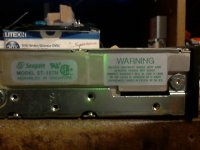
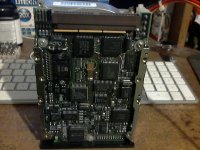
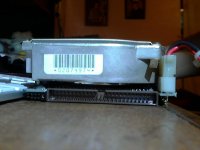
Currently the jumper is on the pins closest to the SCSI connector. I did not move them. That's how it was when it arrived. The guy that sent it to me said it used to be in a SE/30, so I would have to assume the jumper was already correct?
I'm not hearing any unusual noises from the drive. It's kinda loud, but that's to be expected of a drive of this age. Not sure what the head noise pattern for this drive on startup is supposed to sound like.
Perhaps I can try and record audio of it if that helps.
It's odd this thing was in an SE/30. It doesn't appear to have originally came from a compact mac. There is no LED connector (that I'm aware of) and there's a black plastic bazel cover on the front where the drive LED is. I had to cut some plastic off the power connector to get it to go in without putting too much stress on the power connector on the hard-drive.
I don't think it's a power issue otherwise the drive wouldn't spin up or it would spin down due to failed drive startup test. I would think the drive at least pasts it's self-power on test as it remains spinning during the time I have the Macintosh powered up.
Maybe it's just not initialized? But the guy told me he did have MacOS 7 on it and a some programs installed. So it's not looking good.
EDIT:
Ok found some info on the jumper settings. The current jumper in the position it is in enabled "Parity Check". Should that be disabled? The second position past that jumper is "unused" while the next 3 set drive ID. Since there is no additional jumper installed the drive is already on drive ID 0.
It spins up and I can hear the head moving. However it won't boot from it. The floppy disk icon still comes up. Though it does appear to be "trying" to access the drive as I hear the drive head click on a repeating pattern (it only does this while on the floppy disk screen) with the flashing question mark icon occasionally being delayed.
It's either not on the right drive ID or the drive is dead. I booted from my floppy and the drive does not show up on the desktop and it never asks to initialize it. But since I don't have a mouse at the moment it will be difficult to diagnose the problem. I've enclosed some photos below. Perhaps the jumper setting is just wrong. At least I hope that's the problem.
Photos of the drive:
Currently the jumper is on the pins closest to the SCSI connector. I did not move them. That's how it was when it arrived. The guy that sent it to me said it used to be in a SE/30, so I would have to assume the jumper was already correct?
I'm not hearing any unusual noises from the drive. It's kinda loud, but that's to be expected of a drive of this age. Not sure what the head noise pattern for this drive on startup is supposed to sound like.
Perhaps I can try and record audio of it if that helps.
It's odd this thing was in an SE/30. It doesn't appear to have originally came from a compact mac. There is no LED connector (that I'm aware of) and there's a black plastic bazel cover on the front where the drive LED is. I had to cut some plastic off the power connector to get it to go in without putting too much stress on the power connector on the hard-drive.
I don't think it's a power issue otherwise the drive wouldn't spin up or it would spin down due to failed drive startup test. I would think the drive at least pasts it's self-power on test as it remains spinning during the time I have the Macintosh powered up.
Maybe it's just not initialized? But the guy told me he did have MacOS 7 on it and a some programs installed. So it's not looking good.
EDIT:
Ok found some info on the jumper settings. The current jumper in the position it is in enabled "Parity Check". Should that be disabled? The second position past that jumper is "unused" while the next 3 set drive ID. Since there is no additional jumper installed the drive is already on drive ID 0.
Ok the drive shows up on SCSI Probe. Could be it's not formatted correctly. I will try and find a patched or third party HD setup program. The stock Apple HD Setup app doesn't see it. Probably because it may not be an Apple branded drive.
Since SCSI Probe sees it, that rules out connection problems.
Since SCSI Probe sees it, that rules out connection problems.
Sorry for all the double posts, But the forum's time limit on editing posts is too short.
I've gotten a patched version of Apple HD Setup. Started that and it says it can't find a suitable drive. So even the patched version won't initialize it. Since it shows up on SCSI Probe, it isn't a problem with the SCSI bus, connection or the hard-drive logic board.
The drive may simply be failing the self-test and is refusing the mount. Looks like it's dead.
I got it for free, so I can't really complain. But it is disappointing.
I've gotten a patched version of Apple HD Setup. Started that and it says it can't find a suitable drive. So even the patched version won't initialize it. Since it shows up on SCSI Probe, it isn't a problem with the SCSI bus, connection or the hard-drive logic board.
The drive may simply be failing the self-test and is refusing the mount. Looks like it's dead.
I got it for free, so I can't really complain. But it is disappointing.
I would use Lido and try LLFing it.
Is Lido keyboard friendly?
EDIT: I ran it in Basilisk. Doesn't appear I can do anything with this program without a mouse. I wonder if there's some simple app/extension that can assign keys on the keyboard to mouse actions.
I could then use the keyboard to move the mouse. Would be a decent workaround until I get a mouse I would think.
EDIT: I ran it in Basilisk. Doesn't appear I can do anything with this program without a mouse. I wonder if there's some simple app/extension that can assign keys on the keyboard to mouse actions.
I could then use the keyboard to move the mouse. Would be a decent workaround until I get a mouse I would think.
Ok I ran Lido anyway. It starts up and scans the bus. But once it reaches id 0, the hard-drive shows a bit of activity but after about 10 seconds this error comes up:
"OSErr = 5 Bad SCSI Command: phase error."
I click ok and it will then show the device on id 0 and reports the correct capacity for it. (It shows "Drive Unreadable!" message next to where the list of volumes would be).
The error comes up a few more times before letting me do anything. I can't do anything with this program without a mouse, so I don't know if I can format it with this or not.
Any idea what this error means?
"OSErr = 5 Bad SCSI Command: phase error."
I click ok and it will then show the device on id 0 and reports the correct capacity for it. (It shows "Drive Unreadable!" message next to where the list of volumes would be).
The error comes up a few more times before letting me do anything. I can't do anything with this program without a mouse, so I don't know if I can format it with this or not.
Any idea what this error means?
phase error = bad drive.
Is there anything similar to Mouse Keys for MacOS 7? I need to see if I can use the keyboard to control the mouse cursor since I don't have a mouse.
The mouse was the primary point to early Macintosh systems. You kinda have to have one.
Yeah I definitely understand that. I recall Windows machines grew up on the days of MS-DOS and other command line based OSs. So keyboard control was important and retained even in more modern operating systems.
The Macintosh emphasized a mouse driven GUI environment that is simpliar and easily used by more people thus making it marketable to a greater crowd where command line based systems of the time was too complicated to be used in a practical manner by the masses. So it's no surprise the old MacOS software didn't allow one to do much with just a keyboard.
The vintage Macintoshes were literally a different species of computers back then and the reason why I liked them so much. Apple still makes computers, but they are x86 Intel based machines now, so a lot of the charm of having different hard-ware was lost, so I never had an interest in the newer macs.
I suppose I'll just have to wait till I have a mouse before I can find out 100% if this drive is dead or not. Unfortunately this means I'd either have the choice of getting the mouse first (and wait for it to arrive in the mail) to see if the drive is savable or not, or just get another hard-drive with the mouse at the same time and risk having 2 working drives and realize that I had wasted my money.
It's starting to look more like this drive really is dead. But there is that tiny chance that Lido could format it and it would be usable. But alas, I almost got there.
I got a little creative with ResEdit and modified some of the menu options to have command key shortcuts (I did all of this in an emulator on my PC and transferred the result to my boot floppy). I assigned Command+K to the "Maximum Mac Setup" menu option in the Partition Menu.
I assume this does the same thing as what the format button would have done. Only this would LFF it and partition it in one go for me. But alas, the confirmation dialog (the warning message that this would destroy existing data) has the default button as the Cancel button. So pressing enter on the keyboard would activate the Cancel button.
I have yet to find a way to edit the program to where I could use enter to activate the Ok button instead. Thus I'm stuck till I get a mouse. Which drives me insane being how a single dialog has gotten in the way of doing what I had wanted to do. I got so close yet a single button has trolled me.
The Macintosh emphasized a mouse driven GUI environment that is simpliar and easily used by more people thus making it marketable to a greater crowd where command line based systems of the time was too complicated to be used in a practical manner by the masses. So it's no surprise the old MacOS software didn't allow one to do much with just a keyboard.
The vintage Macintoshes were literally a different species of computers back then and the reason why I liked them so much. Apple still makes computers, but they are x86 Intel based machines now, so a lot of the charm of having different hard-ware was lost, so I never had an interest in the newer macs.
I suppose I'll just have to wait till I have a mouse before I can find out 100% if this drive is dead or not. Unfortunately this means I'd either have the choice of getting the mouse first (and wait for it to arrive in the mail) to see if the drive is savable or not, or just get another hard-drive with the mouse at the same time and risk having 2 working drives and realize that I had wasted my money.
It's starting to look more like this drive really is dead. But there is that tiny chance that Lido could format it and it would be usable. But alas, I almost got there.
I got a little creative with ResEdit and modified some of the menu options to have command key shortcuts (I did all of this in an emulator on my PC and transferred the result to my boot floppy). I assigned Command+K to the "Maximum Mac Setup" menu option in the Partition Menu.
I assume this does the same thing as what the format button would have done. Only this would LFF it and partition it in one go for me. But alas, the confirmation dialog (the warning message that this would destroy existing data) has the default button as the Cancel button. So pressing enter on the keyboard would activate the Cancel button.
I have yet to find a way to edit the program to where I could use enter to activate the Ok button instead. Thus I'm stuck till I get a mouse. Which drives me insane being how a single dialog has gotten in the way of doing what I had wanted to do. I got so close yet a single button has trolled me.
Ok once I get a replacement drive, what would I have to do to try and recover data of this drive? I've heard of the freezer trick and also manually moving the head if it gets stuck in the park position.
But my drive isn't really doing any "click of death" noises. It does some clicks on spin up which last about 10-20 seconds, then stops. But it never spins down. (it will click if I query the drive using Lido but get the above mentioned error)
So not sure what the cause would be. Seeing as the drive is a total loss, I would not be afraid of opening it up so I can at least have the chance of getting the original data off it.
I might wait till I have a an external enclosure to run it in first as right now even when I do get a replacement drive, the old one won't have anywhere to go and the data won't get anywhere fast enough.
I suppose I could try and boot off it and setup networking, but I doubt it would function long enough to allow that.
Could be possible that it's capacitor issues? I wonder if these old drives can suffer from that too. I'd imagine so if they used similar capacitors as the ones known to leak from old age.
But my drive isn't really doing any "click of death" noises. It does some clicks on spin up which last about 10-20 seconds, then stops. But it never spins down. (it will click if I query the drive using Lido but get the above mentioned error)
So not sure what the cause would be. Seeing as the drive is a total loss, I would not be afraid of opening it up so I can at least have the chance of getting the original data off it.
I might wait till I have a an external enclosure to run it in first as right now even when I do get a replacement drive, the old one won't have anywhere to go and the data won't get anywhere fast enough.
I suppose I could try and boot off it and setup networking, but I doubt it would function long enough to allow that.
Could be possible that it's capacitor issues? I wonder if these old drives can suffer from that too. I'd imagine so if they used similar capacitors as the ones known to leak from old age.
The heads, or the pre-amp IC is probably bad. Or the tracks are so far mis-aligned it may not be recoverable.
The problem with stepper actuated drives, is alignment. Eventually it drifts.
Some drives have the ability to "rotate" the head stepper motor by loosening up the screws. You can try to see if that brings in alignment. If not, the heads are probably bad.
The problem with stepper actuated drives, is alignment. Eventually it drifts.
Some drives have the ability to "rotate" the head stepper motor by loosening up the screws. You can try to see if that brings in alignment. If not, the heads are probably bad.
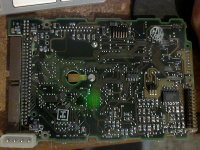
Ok. I've removed the drive and took a closer look at it. I've disconnected the circuit board and noticed something:
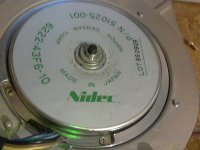
There is some "debris" near the center axle area that contacts a copper fin on the circuit board. Here's a photo of the underside of the circuit board:
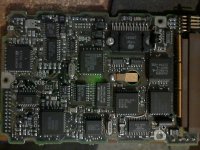
And here's a photo of the top IC. If it has capacitors, it doesn't appear to be using the type prone to leaking:
My main concern is that debris on the center axle. (the whole "disc" area rotates, so it rotates with the platters.
Maybe it's a lubrication issue?
EDIT:
Ok I powered it up with an external power adapter (It came with my IDE/SATA to USB adapter. So it was useful in this case. ).
I noticed the LED flashed 8 times. I found this awhile back:
http://stason.org/TULARC/pc/hard-drives-hdd/seagate/ST157N-0-49MB-3-5-HH-SCSI1-SE.html
Flashes -Failures codes
1 | Microprocessor/Internal Memory Test
2 | Microprocessor ROM Checksum Test
3 |Controller Chip Test
4 |Controller Program RAM Test
5 |Data Buffer RAM Test
6 |Spindle Speed Test
...| If the drive is unable to reach and maintain correct
...| spindle speed
8 |Read Operating System Microcode From Drive
...| If the controller is unable to read the operating system
...| from the drive
9 |Read Operating System Microcode From Drive
...| If the controller reads the operating system records,
...| but determines that they are invalid.
So the drive is telling me the error for number 8. "Read Operating System Microcode From Drive - If the controller is unable to read the operating system from the drive"
Not sure what this means exactly. Perhaps a LFF could fix it. Won't know till I get a mouse though.
That rules out motor sticking though as it would have given me error 6 instead if the spindle couldn't get up to speed. (and in that instance I would believe it would power down on that error)
Edit2: Powered it up a second time and it doesn't display a blinking LED code that time. Seems hit and miss. (mac still didn't boot from it though). I left it on and will see what Lido says this time.
There is some "debris" near the center axle area that contacts a copper fin on the circuit board. Here's a photo of the underside of the circuit board:
And here's a photo of the top IC. If it has capacitors, it doesn't appear to be using the type prone to leaking:
My main concern is that debris on the center axle. (the whole "disc" area rotates, so it rotates with the platters.
Maybe it's a lubrication issue?
EDIT:
Ok I powered it up with an external power adapter (It came with my IDE/SATA to USB adapter. So it was useful in this case.
).I noticed the LED flashed 8 times. I found this awhile back:
http://stason.org/TULARC/pc/hard-drives-hdd/seagate/ST157N-0-49MB-3-5-HH-SCSI1-SE.html
Flashes -Failures codes
1 | Microprocessor/Internal Memory Test
2 | Microprocessor ROM Checksum Test
3 |Controller Chip Test
4 |Controller Program RAM Test
5 |Data Buffer RAM Test
6 |Spindle Speed Test
...| If the drive is unable to reach and maintain correct
...| spindle speed
8 |Read Operating System Microcode From Drive
...| If the controller is unable to read the operating system
...| from the drive
9 |Read Operating System Microcode From Drive
...| If the controller reads the operating system records,
...| but determines that they are invalid.
So the drive is telling me the error for number 8. "Read Operating System Microcode From Drive - If the controller is unable to read the operating system from the drive"
Not sure what this means exactly. Perhaps a LFF could fix it. Won't know till I get a mouse though.
That rules out motor sticking though as it would have given me error 6 instead if the spindle couldn't get up to speed. (and in that instance I would believe it would power down on that error)
Edit2: Powered it up a second time and it doesn't display a blinking LED code that time. Seems hit and miss. (mac still didn't boot from it though). I left it on and will see what Lido says this time.
That means the drive's controller couldnt not read the system area track, or whats known as the negative cylinder/tracks. This is an array of tracks behind Track 0. tells the drive the G-List, P-List, geometry, and other low level information required.
It appears the ST-157N which I believe you have? is an early voice-coil actuated drive. Chances are, the heads crashed long ago.
It appears the ST-157N which I believe you have? is an early voice-coil actuated drive. Chances are, the heads crashed long ago.
I have two dead microdrive 8425s here. trust me, I know.
Yep that's the exact model. Although this one is a bit peculier. It has a black face plate on the front with LED. (so there is no connector to attach the SE's LED cord to. ).
It looks like this particular drive was meant to be in a server rack of some kind perhaps. Odd that it found it's way into an SE/30.
I've seen identical models on eBay that don't have this faceplate.
Damn, sounds like something that can't be fixed then. Data is gone for good it looks like.
).It looks like this particular drive was meant to be in a server rack of some kind perhaps. Odd that it found it's way into an SE/30.
I've seen identical models on eBay that don't have this faceplate.
Damn, sounds like something that can't be fixed then. Data is gone for good it looks like.
Without a working donor drive to borrow a headstack from? Yup...
Hi Apache Thunder,
Nice machine. I've still got the SE I bought as a teenager back in 1989, and bought an SE/30 along with it a while ago. On eBay they're expensive, but on local (online) markets they're still affordable; the going rate in my part of Europe (Netherlands/Germany) is around 75-100 euros for a good one. My own SE/30, a fine recapped specimen, set me back 75 euros. The keyboard wasn't contemporary (same one as yours, you might want to replace that), so I got an Extended Keyboard (M0115 "Saratoga") for another fifty. I guess shipping from Europe to the US would be expensive, but seeing the prices on eBay it might even be worth it.
Nice machine. I've still got the SE I bought as a teenager back in 1989, and bought an SE/30 along with it a while ago. On eBay they're expensive, but on local (online) markets they're still affordable; the going rate in my part of Europe (Netherlands/Germany) is around 75-100 euros for a good one. My own SE/30, a fine recapped specimen, set me back 75 euros. The keyboard wasn't contemporary (same one as yours, you might want to replace that), so I got an Extended Keyboard (M0115 "Saratoga") for another fifty. I guess shipping from Europe to the US would be expensive, but seeing the prices on eBay it might even be worth it.
Ok, my Macintosh SE is up and running now with a mouse, hard-drive, and a scsi zip drive I snagged off eBay for a cool $14 shipped. Aside from not having a PRAM battery for the thing yet (I have removed the Maxwell time bomb a few weeks ago. ), there are no issues I'm having. I created a thread in the conquests section that shows off this SE. If I encounter any issues specific to this machine, I will post again here.
By the way, anyone know of a way of converting a wav file to a snd file? (the sound files MacOS uses). I want to try and put in a custom beep sound for MacOS. As I understand it, the beep sounds in the sound control panel are stored in the System file. I can easily drop new ones in, but I need to find a way of generating new ones.
The format is pretty old and none of the audio converters I have have any idea how to convert to such an obsolete sound format. Perhaps some basic audio program for MacOS 7 that will run on my SE might be able to do it. I can convert the file locally on the SE if I have to.
The audio file I want to use is really short like the other ones, so I don't expect any problems using it on this machine. The SE doesn't have the Apple Sound Chip like the 030 based SE/30, so that might limit my choices of audio playback conversion if I were to try it locally on the SE.
), there are no issues I'm having. I created a thread in the conquests section that shows off this SE. If I encounter any issues specific to this machine, I will post again here. By the way, anyone know of a way of converting a wav file to a snd file? (the sound files MacOS uses). I want to try and put in a custom beep sound for MacOS. As I understand it, the beep sounds in the sound control panel are stored in the System file. I can easily drop new ones in, but I need to find a way of generating new ones.
The format is pretty old and none of the audio converters I have have any idea how to convert to such an obsolete sound format. Perhaps some basic audio program for MacOS 7 that will run on my SE might be able to do it. I can convert the file locally on the SE if I have to.
The audio file I want to use is really short like the other ones, so I don't expect any problems using it on this machine. The SE doesn't have the Apple Sound Chip like the 030 based SE/30, so that might limit my choices of audio playback conversion if I were to try it locally on the SE.
If you can get ahold of QuickTime's Movie Player 2.5, that I think will convert stuff to .snd files (I don't know about .wav to .snd specifically, but I think it does .aif/.aiff to .snd (AIFF is Apple's equivalent to Microsoft's WAV).
c
c
lol. I did not think to check the Quicktime software. I ran MoviePlayer (it would likely not run on an SE do to lack of color quickdraw) and it does support wave files. But I used AIFF anyways as I had already converted the file to that. Looks like I now have a "System 7 Sound" which is exactly what I need.
Saving SND files involves using the export menu instead of the save as menu.
Saving SND files involves using the export menu instead of the save as menu.
Ok came too late to edit so sorry about the double post. Finally got my System 7 sound to work on the SE. Turns out the SE was being picky. It has to be 8-bit 22khz Mono and I had to copy over a "alis" resource from an existing system sound using ResEdit. (though I'm not sure if that was actually needed or not, but did so anyways since I noticed the ones QuickTime made didn't have it).
I'm not sure if it had to be mono or not, but just did it based on the other sounds System 7.1.1 came with. Initially I was generating 16-bit wave files and that's a no no for an SE apparently.
After that my SE played the sound perfectly.
QuickTime Movie Player does indeed accept wave files. So just grab a wave file and give it "WAVE" file type and "TVOD" as the creator and it will see the wave file correctly.
I'm not sure if it had to be mono or not, but just did it based on the other sounds System 7.1.1 came with. Initially I was generating 16-bit wave files and that's a no no for an SE apparently.
After that my SE played the sound perfectly.
QuickTime Movie Player does indeed accept wave files. So just grab a wave file and give it "WAVE" file type and "TVOD" as the creator and it will see the wave file correctly.
Noticed this from a recent eBay listing of a Macintosh SE:
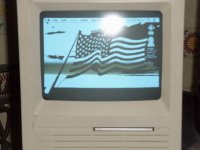
It appears to have a "wallpaper" set. However "Desktop Patterns" is the only Control Panel I know that can place graphics on the background (beyond basic patterns from the General Settings control panel) and it won't work on an SE (I tried. That and it can really only do tiling of small images. Nothing like the single large image being displayed on that photo)
But appearently there is other ways of doing this as that SE has a graphic in the background. Perhaps a special application, extension, or control panel can do this. It would be cool to have a background for my desktop. Any ideas on what was used on that SE to do that? (The seller doesn't appear to be aware of how either as he has no keyboard/mouse and can't do anything but boot it up)
All I can easily tell is that this SE is a SuperDrive like mine, but has two floppies instead of a hard-drive and floppy. The OS appears to be MacOS 7+ as the Finder Help icon is visible on the top right corner.
There is however an extra arrow icon beside the Apple Menu and that appears to be something added by a third party app. Can't be too complicated all that fits on a single floppy.
EDIT: Another interesting bit is that he appears to have a unit with 2 floppies and a hard-drive. I just noticed he only has one floppy inserted and there's two drive icons on the desktop. That and the floppy he inserted was for a "Crash and Burn" game which I doubt would be a bootable disk. He didn't mention having any external devices.
It's got that clock control panel added and I can already tell it probably still has the original PRAM battery as one with a missing/dead battery will always boot up showing Friday. I forget the exact time and date it resets to, but that date is always on a Friday.
It appears to have a "wallpaper" set. However "Desktop Patterns" is the only Control Panel I know that can place graphics on the background (beyond basic patterns from the General Settings control panel) and it won't work on an SE (I tried. That and it can really only do tiling of small images. Nothing like the single large image being displayed on that photo)
But appearently there is other ways of doing this as that SE has a graphic in the background. Perhaps a special application, extension, or control panel can do this. It would be cool to have a background for my desktop. Any ideas on what was used on that SE to do that? (The seller doesn't appear to be aware of how either as he has no keyboard/mouse and can't do anything but boot it up)
All I can easily tell is that this SE is a SuperDrive like mine, but has two floppies instead of a hard-drive and floppy. The OS appears to be MacOS 7+ as the Finder Help icon is visible on the top right corner.
There is however an extra arrow icon beside the Apple Menu and that appears to be something added by a third party app. Can't be too complicated all that fits on a single floppy.
EDIT: Another interesting bit is that he appears to have a unit with 2 floppies and a hard-drive. I just noticed he only has one floppy inserted and there's two drive icons on the desktop. That and the floppy he inserted was for a "Crash and Burn" game which I doubt would be a bootable disk. He didn't mention having any external devices.
It's got that clock control panel added and I can already tell it probably still has the original PRAM battery as one with a missing/dead battery will always boot up showing Friday. I forget the exact time and date it resets to, but that date is always on a Friday.
For system 6/7 there is DeskPicture. I used to have a link, can't find it at the moment...
Thanks! I ended up finding it on some site called MacGUI. There was two versions I found. One was an extension. Didn't really get that to work. But the second one went with the same name but with "v4.02" specified as it's version. Seems to be a seperate program from the other one I found. This one was a Control Panel (only available as shareware it seems. So I have to put up with a nag dialog box once a month on bootup. I suppose this is more then acceptable. I've seen other shareware have much worse nag screen policies and what not, so I won't complain. ).
It seems to take up 200k of ram though. But for the moment I still have 2.4MB of free ram so for now not an issue. (It does have an option of loading the image from disk instead of ram, so the picture I set only takes up 1K of additional ram).
I will try and find a more suitable wallpaper for it as I just used my avatar as a test.
Also this did not result in the addition of an arror icon near the Apple Menu, so somethine else is adding that in that photo from the seller. Not really something I'm interested in though just noting that the arrow seems to be something else unrelated to the wallpaper program.
).It seems to take up 200k of ram though. But for the moment I still have 2.4MB of free ram so for now not an issue. (It does have an option of loading the image from disk instead of ram, so the picture I set only takes up 1K of additional ram).
I will try and find a more suitable wallpaper for it as I just used my avatar as a test.
Also this did not result in the addition of an arror icon near the Apple Menu, so somethine else is adding that in that photo from the seller. Not really something I'm interested in though just noting that the arrow seems to be something else unrelated to the wallpaper program.
In the original picture of your Mac SE you have a good picture of the ball lightning produced in it, does the Mac happen to come from Area 51 ?
You may already know there is a hidden picture of the Mac SE development team in the SE ROM, and there is some way of activating (displaying) that picture during startup.
Vis-a-vis the 200K, a well-behaved application should let you configure the amount of RAM that individual application is allowed to use. You might be able to set it down to 128K or 64K ? I do not know (remember) what the lower limit is.
D
You may already know there is a hidden picture of the Mac SE development team in the SE ROM, and there is some way of activating (displaying) that picture during startup.
Vis-a-vis the 200K, a well-behaved application should let you configure the amount of RAM that individual application is allowed to use. You might be able to set it down to 128K or 64K ? I do not know (remember) what the lower limit is.
D